GoHighLevel Fluent Forms Integration: Setup & Cost (2026)
By Dr Priya Jaganathan, GoHighLevel Certified Admin · HL Growth Partner, Australia · Updated 20 October 2026 · 10 min read
Some links below are affiliate links — if you sign up through them, HL Growth Partner may earn a commission at no extra cost to you. It never changes what we recommend.
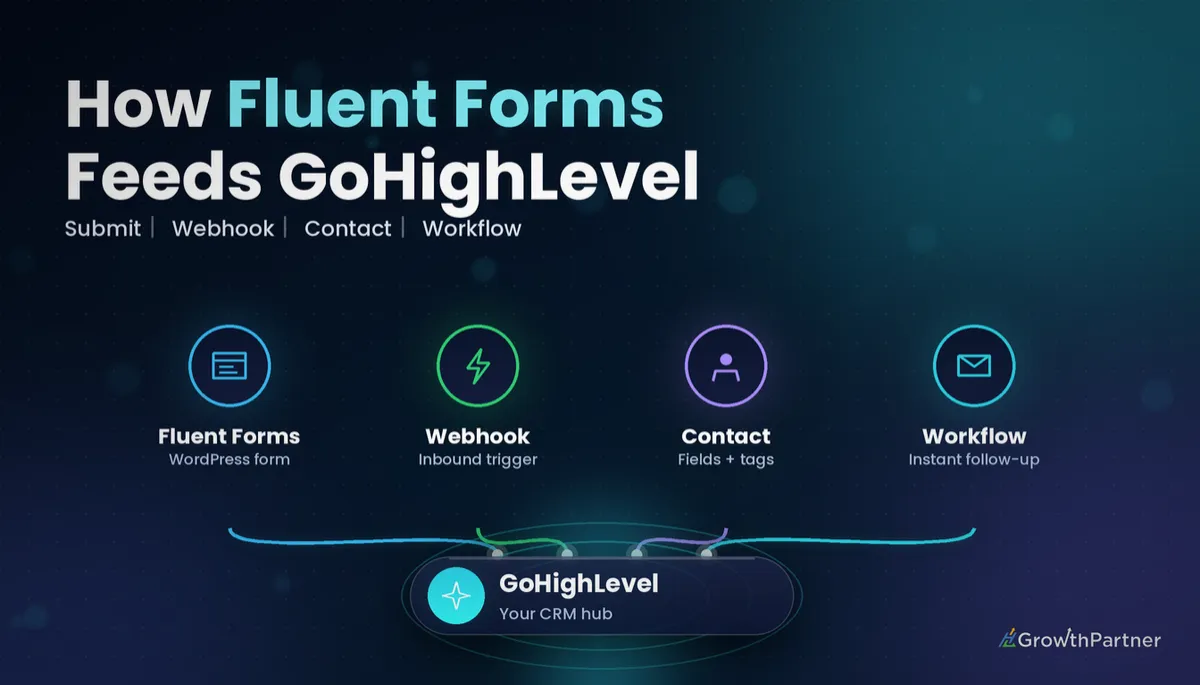
A GoHighLevel Fluent Forms integration lets you keep the fast, flexible WordPress forms your client already loves while every submission lands in HighLevel as a clean contact, tagged, mapped and dropped straight into a follow-up Workflow. Done badly, it creates duplicate contacts, empty custom fields and leads that sit untouched for days.
This guide is part of our WordPress form-integration series. I'll walk through the three realistic ways to connect Fluent Forms to HighLevel, what each one actually costs in October 2026, and the field-mapping and testing habits that stop the integration from quietly breaking six weeks after handover.
Quick Facts
| Fluent Forms developer | WPManageNinja (WordPress plugin, free and Pro versions) |
| Webhook feature | Requires Fluent Forms Pro, per the official Fluent Forms docs |
| Fluent Forms Pro list price | From $79/year for a single site (WPManageNinja product page, October 2026) |
| HighLevel receiving end | Inbound Webhook workflow trigger, a premium trigger |
| Premium execution allowance | 100 free lifetime executions per sub-account, then $0.01 each pay-as-you-go |
| HighLevel plans | Starter $97, Unlimited $297, Agency Pro $497 per month |
Three ways to connect Fluent Forms to HighLevel
There is no native, one-click Fluent Forms app inside HighLevel. That means you're choosing between a direct webhook, a middleware tool, or replacing the form altogether.
- Direct webhook: Fluent Forms Pro posts each submission to a HighLevel Inbound Webhook trigger URL.
- Middleware: Zapier, Make or Pabbly Connect sits between the two, catching the submission and creating or updating the contact.
- Native GHL form embed: you rebuild the form in HighLevel's form builder and embed it on the WordPress page instead.
If you've followed our GoHighLevel WPForms integration guide, the logic will feel familiar. The difference with Fluent Forms is where the paywall sits.
Method 1: Fluent Forms webhook to the Inbound Webhook trigger
This is my default for agencies. The submission travels from WordPress straight to HighLevel with no third party in the middle, so there's one fewer subscription and one fewer thing to break.
The catch is that webhooks are a Pro-only feature in Fluent Forms. The free plugin won't do this, so budget for a Pro licence if the client is on the free version.
Method 2: Zapier, Make or Pabbly as middleware
Middleware makes sense when the submission also needs to go somewhere else, such as a Google Sheet or an accounting tool. It also gives non-technical team members a visual history of every run.
Be aware that Fluent Forms' own documentation lists its Zapier integration as a Pro feature too, so middleware doesn't get you around the Pro licence.
Method 3: Replace it with a native HighLevel form
If the form is a simple lead capture with five or six fields, rebuilding it in HighLevel is often the cleanest answer. Submissions write straight to the contact record, and you can use the Form Submitted trigger without any premium execution charges.
Keep Fluent Forms where it earns its place: complex conditional logic, calculations, multi-step quotes or payment forms that the client's web team already maintains.
What a GoHighLevel Fluent Forms integration really costs
Most of the cost questions I get are about the hidden pieces: the Pro licence, the premium trigger and the middleware tier. Here is what I could confirm against official pages this month.
| Item | Price (October 2026) | Source |
|---|---|---|
| Fluent Forms (free plugin) | $0, but no webhook or Zapier feeds | Fluent Forms docs |
| Fluent Forms Pro, single site | $79/year list price (sale pricing often lower) | WPManageNinja product page |
| HighLevel premium executions | 100 free lifetime per sub-account, then $0.01 per execution | HighLevel Support Portal |
| HighLevel Workflow Pro (Starter tier) | $10/month for 10,000 premium executions | HighLevel Support Portal |
| Zapier Free | $0, 100 tasks/month, no premium apps such as Webhooks by Zapier | Zapier pricing page |
| Zapier Professional | From $19.99/month billed annually | Zapier pricing page and blog |
| HighLevel subscription | Starter $97, Unlimited $297, Agency Pro $497 per month | gohighlevel.com/pricing |
Per HighLevel's Support Portal, the Inbound Webhook trigger is a premium trigger. Each eligible sub-account gets 100 free premium executions for its lifetime, not per month, and then usage is billed at $0.01 per execution unless the sub-account is on a Workflow Pro plan.
For a client receiving 300 enquiries a month, that's a few dollars of usage. Agencies can rebill those charges to the sub-account with a markup, which is worth setting up before you go live.
Make and Pabbly Connect publish their own tiers, and they change often. I'd check their live pricing pages on the day you quote rather than rely on a number in a blog post.
How to connect Fluent Forms to HighLevel with a webhook
This is the direct method, step by step. Allow about 30 to 45 minutes per form the first time, including testing.
Step 1: Create the Workflow and copy the webhook URL
In the client's sub-account, create a new Workflow and add the Inbound Webhook trigger. HighLevel generates a unique URL for that trigger, so copy it somewhere safe.
HighLevel's Inbound Webhook trigger documentation notes the payload needs to be JSON with keys that contain no spaces. Our inbound and outbound webhooks setup guide covers the trigger in more depth.
Step 2: Enable the webhook module in Fluent Forms Pro
In WordPress, open Fluent Forms, go to Integrations and switch on the Webhooks module. Then open the form's settings, add a new integration feed and choose the webhook option, as outlined in the official Fluent Forms webhook guide.
Give the feed a clear name, paste the HighLevel URL as the request URL, set the method to POST and the body format to JSON.
Step 3: Send a test submission
Submit the live form once with realistic data. Back in HighLevel, fetch the sample request on the trigger so the incoming fields become available for mapping.
If nothing arrives, check for a security or caching plugin blocking outbound requests before you blame HighLevel.
Field mapping, UTM capture and tags
After the trigger, add a create or update contact action and map each incoming key to a standard field or custom field. HighLevel needs either an email or a phone value to create or match a contact.
Map to custom fields deliberately
Create custom fields before you map, and name them the same way across every sub-account in your snapshot. A field called "Service Interest" in one account and "Service Type" in another makes reporting painful later.
For anything you need to calculate or tidy after creation, the Update Contact Field action is the right tool rather than overloading the first mapping step.
Capture UTMs with hidden fields
Add hidden fields to the Fluent Forms form for utm_source, utm_medium, utm_campaign and the landing page URL, populated from the page's URL parameters. Map each one to its own custom field in HighLevel.
This is what lets the client see which ad or campaign produced each opportunity, rather than everything landing as "website".
Tag on the way in
Add a tag that identifies the source form, such as a form-specific tag, in the same Workflow. Tags make it easy to segment, build smart lists and trigger downstream automations without re-reading every field.
Not on HighLevel yet? Start with a free 30-day trial here — long enough to build everything in this guide before you pay a cent.
Deduping by email and phone when you connect Fluent Forms to HighLevel
Duplicates are the most common complaint I see on inherited builds. HighLevel's duplicate-contact behaviour is controlled at the sub-account level, and it matches on email and phone.
- Confirm the sub-account's duplicate-contact setting matches how the client actually works.
- Make email or phone required on the Fluent Forms side so every submission has a match key.
- Format phone numbers consistently, ideally with the country code, so +61 and 04 numbers don't create two records.
Then test the edge cases on purpose: the same person twice, a submission with only a phone number, and an obvious spam entry. Our Gravity Forms integration walkthrough uses the same three-test routine.
Building the follow-up Workflow
Once the contact is created, the rest is normal HighLevel automation. Keep the receiving Workflow focused, then hand off to a follow-up Workflow or add the contact to a pipeline.
- Create an opportunity in the right pipeline stage.
- Send an instant SMS and email acknowledgement, with A2P registration sorted first for US numbers.
- Notify the assigned team member internally.
- Start a short nurture sequence if nobody books within a set window.
Use workflow trigger filters to stop internal tests and specific forms from firing the wrong sequence. If Conversation AI handles first replies, make sure it can see the custom fields you've just mapped.
Which Fluent Forms to GoHighLevel method should you choose?
| Method | Ongoing cost | Reliability | Typical setup time (our estimate) | Best for |
|---|---|---|---|---|
| Fluent Forms Pro webhook to Inbound Webhook | Pro licence plus premium executions | High, one hop | 30–45 minutes per form | Agencies managing many WordPress client sites |
| Zapier, Make or Pabbly middleware | Pro licence plus middleware subscription | High, but two systems to monitor | 20–40 minutes per form | Submissions that must also reach other apps |
| Native HighLevel form embed | Included in your HighLevel plan | Highest, no hand-off | Rebuild time for the form | Simple lead forms and new builds |
For most local-service clients, I'd start with the direct webhook and only add middleware when a second destination genuinely exists.
Common mistakes to avoid
- Assuming the free Fluent Forms plugin can send webhooks, then discovering the feature is Pro-only mid-build.
- Forgetting that the 100 free premium executions are lifetime, not monthly, and not setting up rebilling.
- Mapping everything into the notes field instead of proper custom fields.
- Skipping hidden UTM fields, so every lead reports as "website" with no campaign attribution.
- Leaving phone formatting inconsistent, which creates duplicate contacts.
- Testing once with your own email and never re-testing after the client edits the form.
If you want your WordPress forms wired into GoHighLevel with clean field mapping and instant follow-up, book a strategy call with the HL Growth Partner team.
Or if you just need the software first: grab the 30-day HighLevel trial and book us when you're ready to scale it.
Frequently asked questions
Does Fluent Forms integrate natively with GoHighLevel?
There is no one-click native connection between Fluent Forms and HighLevel. You connect them with a Fluent Forms webhook, a middleware tool such as Zapier, Make or Pabbly, or by replacing the form with a native HighLevel form.
Can I use the free version of Fluent Forms with HighLevel?
Not for automatic sending. The official Fluent Forms documentation lists webhooks and the Zapier integration as Pro features. If the client wants to stay on the free plugin, a native HighLevel form embed is usually the better option.
Is the Inbound Webhook trigger free in HighLevel?
The Inbound Webhook trigger is a premium trigger. Per HighLevel's Support Portal, each eligible sub-account gets 100 free lifetime premium executions, after which usage is billed at $0.01 per execution unless the sub-account is on a Workflow Pro plan.
Do I need Zapier to connect Fluent Forms to HighLevel?
No. Fluent Forms Pro can post directly to a HighLevel Inbound Webhook trigger. Zapier is useful when the same submission also needs to reach other apps, but its Webhooks by Zapier app requires a paid Zapier plan.
How do I stop duplicate contacts from Fluent Forms submissions?
Make email or phone a required field, format phone numbers consistently with the country code, and check the sub-account's duplicate-contact setting. HighLevel matches existing contacts on email and phone, so clean data is what makes deduping work.
Can I track UTM parameters from Fluent Forms in HighLevel?
Yes. Add hidden fields in Fluent Forms that pull utm_source, utm_medium and utm_campaign from the page URL, then map each one to its own custom field in HighLevel. That gives you campaign attribution on every contact and opportunity.
Should I replace Fluent Forms with a HighLevel form?
For simple lead capture forms, often yes, because submissions write straight to the contact with no premium executions or middleware. Keep Fluent Forms for complex conditional logic, calculations or multi-step forms that the client's web team already maintains.
Related Articles on HL Growth Partner
More WordPress form integrations
- GoHighLevel Contact Form 7 Integration: Setup & Cost (2026)
- GoHighLevel Elementor Integration: Setup & Cost (2026)
- GoHighLevel WordPress Integration: Setup & Cost (2026)
Workflow triggers and automation
- GoHighLevel Form Submitted Trigger: Setup Guide (2026)
- GoHighLevel Contact Created Trigger: Setup Guide (2026)
- GoHighLevel Webhooks & Zapier: Integration Guide (2026)
