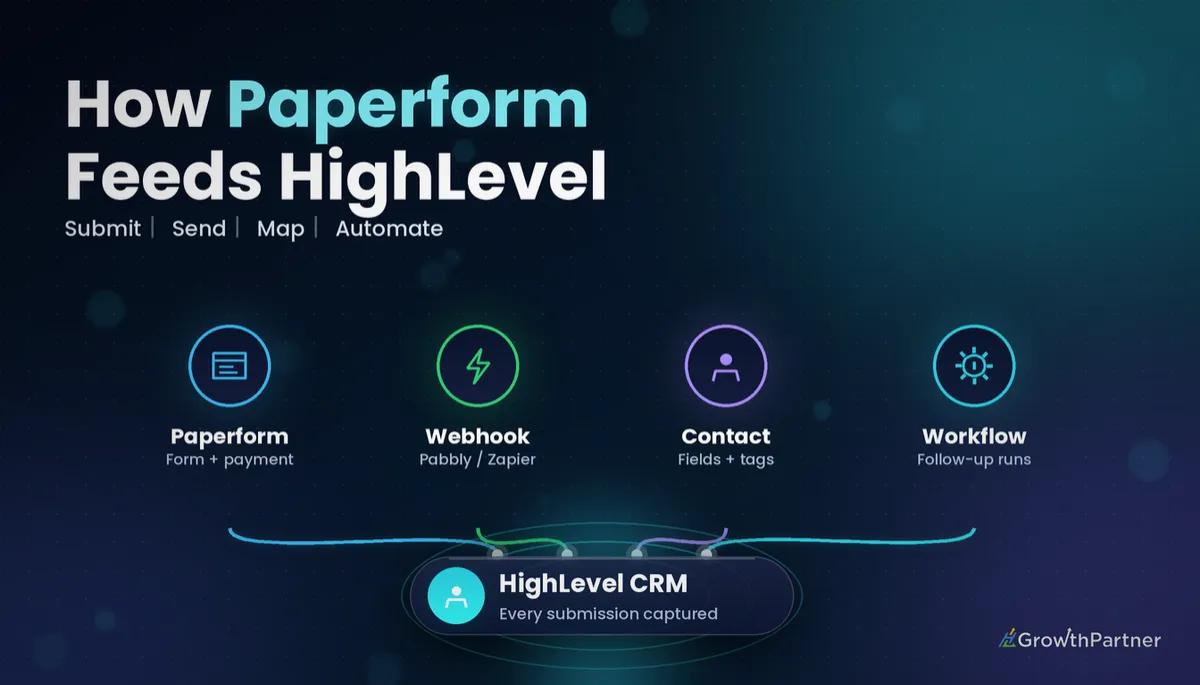
GoHighLevel Paperform Integration: Setup & Cost (2026)
By Dr Priya Jaganathan, GoHighLevel Certified Admin · HL Growth Partner, Australia · Updated 23 October 2026 · 9 min read
Some links below are affiliate links — if you sign up through them, HL Growth Partner may earn a commission at no extra cost to you. It never changes what we recommend.
A clean GoHighLevel Paperform integration means every Paperform submission lands in HighLevel as a tidy contact, with the right custom fields filled, the right tags applied and the right workflow already running. Done badly, it means duplicate contacts, empty fields and leads nobody follows up.
This guide walks through how to connect Paperform to HighLevel in 2026, what each route actually costs, and when you are better off replacing Paperform with native HighLevel forms. It is part of our form-integration series, alongside Typeform, Jotform, Gravity Forms, WPForms and Google Forms.
Quick Facts
| Native Paperform app in HighLevel | None documented in HighLevel's official docs |
| Paperform paid plans (annual billing, 2026) | Essentials US$24/mo, Pro US$49/mo, Business US$99/mo; free tier available |
| Paperform submission limits per year | Essentials 1,200, Pro 12,000, Business 120,000 |
| Inbound Webhook trigger | Premium trigger, billed per execution |
| Premium execution billing (HighLevel Help Centre) | 100 free lifetime executions per eligible sub-account, then US$0.01 each unless Workflow Pro is active |
| HighLevel plans (2026) | Starter US$97/mo, Unlimited US$297/mo, Agency Pro US$497/mo |
Is Paperform worth keeping alongside HighLevel?
Before you build any connection, decide whether Paperform still earns its place. HighLevel ships with native forms and surveys that already write to contacts, fire the Form Submitted trigger and cost nothing extra on top of your plan.
That said, Paperform genuinely does some things better. In our client builds, it is worth keeping when the form itself is part of the product experience.
- Rich, editorial design — long-form pages that read like a landing page, with images, video and copy woven between questions.
- Calculations — quote builders, pricing estimators and scored assessments that need logic HighLevel forms do not handle as elegantly.
- Payments inside the form — taking a deposit or selling a product as part of the submission.
- Embedded long-form intake — detailed onboarding or application forms already embedded across an existing website.
If none of those apply, the honest answer is usually to rebuild the form natively. Every extra tool in the chain is one more place for data to break. If your team is weighing similar tools, our GoHighLevel Typeform integration guide covers the same keep-or-replace decision for conversational forms.
Two ways to connect Paperform to HighLevel
Because there is no native Paperform app documented inside HighLevel, every working setup relies on Paperform's webhook integration. You find it in Paperform under After Submission > Integrations > Webhooks, and it sends the submission data to a URL you choose.
The question is where that URL points.
Route A: Paperform webhook to middleware (Pabbly Connect, Zapier or Make)
Here the webhook posts to a middleware tool such as Pabbly Connect, Zapier or Make. The middleware then uses the LeadConnector app to create or update the contact in HighLevel, add tags and, if needed, add the contact to a workflow.
This route suits agencies already running a middleware account for other clients. It also gives you a visual history of every run, which helps when something fails. Our GoHighLevel Zapier integration walkthrough explains how the LeadConnector app authenticates against a sub-account.
Route B: Paperform webhook straight to an Inbound Webhook trigger
The leaner option is to post Paperform's webhook directly to a HighLevel workflow that starts with the Inbound Webhook trigger. Inside the workflow you map the incoming fields to the contact, then carry on with tags, notifications and follow-up.
The catch is that Inbound Webhook is a premium trigger, listed in HighLevel's official list of workflow triggers. If you have not used one before, our guide to GoHighLevel inbound and outbound webhooks covers how to capture a sample payload and map it.
GoHighLevel Paperform integration setup, step by step
Whichever route you choose, the build order is the same. Set up HighLevel first, then point Paperform at it.
| Step | What to do | Why it matters |
|---|---|---|
| 1. Build custom fields first | Create every HighLevel custom field the Paperform answers need before you touch the webhook. | You cannot map data into a field that does not exist yet, and rushed fields end up as the wrong type. |
| 2. Map fields | Match each Paperform question key to a standard contact field or custom field. | Unmapped answers are silently lost. |
| 3. Upsert by email/phone | Use a create-or-update contact action keyed on email (and phone as a fallback). | Repeat submitters update one record instead of creating duplicates. |
| 4. Apply tags | Add a form-specific tag such as "paperform-quote-request". | Tags drive segmentation, reporting and workflow filters. |
| 5. Record source attribution | Write the form name and any UTM values to a source field. | You can see which form and campaign produced each lead. |
| 6. Trigger the workflow | Start follow-up: internal notification, confirmation email or SMS, and an opportunity in the right pipeline. | The lead gets a response while they are still interested. |
A quick rule of thumb on step 4 versus step 1: store answers in custom fields, store states in tags. A budget range is a custom field; "requested a quote" is a tag. We unpack that distinction in GoHighLevel tags vs custom fields.
What the Paperform HighLevel integration really costs
Paperform's pricing page (2026, annual billing) lists Essentials at US$24/month, Pro at US$49/month and Business at US$99/month, with a free tier available. Paperform caps submissions per year at 1,200 on Essentials, 12,000 on Pro and 120,000 on Business. Monthly billing costs more, and prices can change, so check the official Paperform pricing page before you commit.
On the HighLevel side, plans sit at Starter US$97/month, Unlimited US$297/month and Agency Pro US$497/month (HighLevel pricing, 2026). The variable cost depends on which route you take.
| Option | What you pay for | Best for |
|---|---|---|
| Paperform + middleware (Pabbly Connect, Zapier or Make) | Your Paperform tier plus your middleware subscription; HighLevel plan as usual | Agencies already paying for middleware, or multi-step routing to several apps |
| Paperform + Inbound Webhook trigger | Your Paperform tier plus premium executions: 100 free lifetime per eligible sub-account, then US$0.01 each unless Workflow Pro is active | Single-destination setups where you want fewer moving parts |
| HighLevel native forms/surveys | US$0 extra beyond your HighLevel plan | Standard lead capture, enquiries and intake without heavy design or calculation needs |
Those premium execution terms come from HighLevel's Help Centre (2026). For most small businesses, a cent per submission after the free allowance is far cheaper than a middleware subscription, but it does add up on high-volume forms, so watch your usage.
Or replace Paperform with native HighLevel forms
If your Paperform forms are mostly name, email, phone and a few qualifying questions, rebuilding them in HighLevel removes the integration entirely. Native forms fire the standard Form Submitted trigger, cost US$0 extra and keep the data inside the platform. Our GoHighLevel Form Submitted trigger guide shows how to set that up properly.
Not on HighLevel yet? Start with a free 30-day trial here — long enough to build everything in this guide before you pay a cent.
Testing your Paperform to HighLevel connection
Never switch a live form over without testing end to end. We run the same checks on every build.
- Send a real test submission from Paperform using an email address you control, with every field filled.
- Check the contact record in HighLevel: standard fields, custom fields, tags and source all populated correctly.
- Submit again with the same email and confirm the existing contact updated rather than a second contact appearing.
- Review the workflow history to confirm the contact entered, each action ran and any filters behaved as expected.
- Test edge cases: optional fields left blank, international phone formats and multi-select answers.
If you are on the Inbound Webhook route, remember that test runs count as executions too. That is rarely an issue, but it is worth knowing when you are burning through the free allowance during a build.
Preventing duplicate contacts from Paperform
Duplicates are the most common complaint we hear about form integrations. They usually come from creating a contact on every submission rather than looking it up first.
Make email a required field in Paperform, and validate the phone field so the format is consistent. Then use an upsert action keyed on email, with phone as a secondary match. Check your sub-account's duplicate contact settings as well, so HighLevel's own matching rules line up with what your integration expects.
Consent checkboxes and the Australian Spam Act
If you will email or text people after they submit, your Paperform needs a clear, unticked opt-in checkbox explaining what they are agreeing to receive. Under Australia's Spam Act, you need consent before sending commercial electronic messages, and you need to be able to show how you got it.
Map that checkbox to its own custom field in HighLevel, and record the form name and submission date alongside it. Then use a workflow filter so marketing messages only go to contacts who actually opted in, while transactional confirmations still go to everyone.
Common mistakes to avoid
- Mapping fields before the HighLevel custom fields exist, then patching them in with the wrong field type.
- Using a "create contact" action instead of create-or-update, which floods the CRM with duplicates.
- Forgetting a form-specific tag, so you cannot tell Paperform leads apart from other sources.
- Leaving the Inbound Webhook trigger unmonitored on a high-volume form and being surprised by premium execution charges.
- Pre-ticking the marketing consent box, or not storing consent in HighLevel at all.
- Keeping Paperform for simple contact forms that native HighLevel forms would handle at no extra cost.
If you want your Paperform (or any form tool) wired cleanly into HighLevel, book a strategy call with the HL Growth Partner team.
Or if you just need the software first: grab the 30-day HighLevel trial and book us when you're ready to scale it.
Frequently asked questions
Does HighLevel have a native Paperform integration?
No native Paperform app is documented in HighLevel's official docs. The working options are Paperform's webhook integration sent to middleware such as Pabbly Connect, Zapier or Make, or sent directly to a HighLevel workflow using the Inbound Webhook trigger.
How do I connect Paperform to HighLevel without Zapier?
In Paperform, go to After Submission, then Integrations, then Webhooks, and paste the URL from a HighLevel workflow that starts with the Inbound Webhook trigger. Map the incoming fields to the contact inside the workflow, then add your tags and follow-up actions.
Is the Inbound Webhook trigger free in HighLevel?
It is a premium trigger billed per execution. According to HighLevel's Help Centre, each eligible sub-account gets 100 free lifetime premium executions, after which the standard charge is US$0.01 per execution unless a Workflow Pro plan is active.
How much does Paperform cost in 2026?
Paperform's pricing page lists Essentials at US$24/month, Pro at US$49/month and Business at US$99/month on annual billing, plus a free tier. Monthly billing costs more, and prices can change, so confirm on Paperform's official pricing page.
How do I stop Paperform creating duplicate contacts in HighLevel?
Make email required in Paperform and use a create-or-update contact action keyed on email, with phone as a fallback. Then check your sub-account's duplicate contact settings and test by submitting twice with the same email address.
Should I replace Paperform with HighLevel forms?
Replace it if your forms are mostly contact details and a few qualifying questions, because native forms cost nothing extra and need no integration. Keep Paperform when you rely on its rich design, calculations, in-form payments or long-form embedded pages.
Do I need a consent checkbox on my Paperform?
If you plan to send marketing emails or SMS, yes. Australia's Spam Act requires consent before sending commercial electronic messages, so use a clear, unticked opt-in checkbox and store the answer in a HighLevel custom field.
Related Articles on HL Growth Partner
More form integrations
- GoHighLevel Jotform Integration: Setup & Cost
- GoHighLevel Google Forms Integration: Setup & Cost
- GoHighLevel Gravity Forms Integration: Setup & Cost
