GoHighLevel TimeCamp Integration: Setup & Cost (2026)
 By Dr Priya Jaganathan, GoHighLevel Certified Admin · HL Growth Partner, Australia · Updated 23 November 2026 · 10 min read
How to connect TimeCamp to HighLevel in 2026 without a native app: the three routes that work, step-by-step setup for each, what the stack really costs, and the mistakes that quietly break client hour reporting.
Some links below are affiliate links — if you sign up through them, HL Growth Partner may earn a commission at no extra cost to you. It never changes what we recommend.
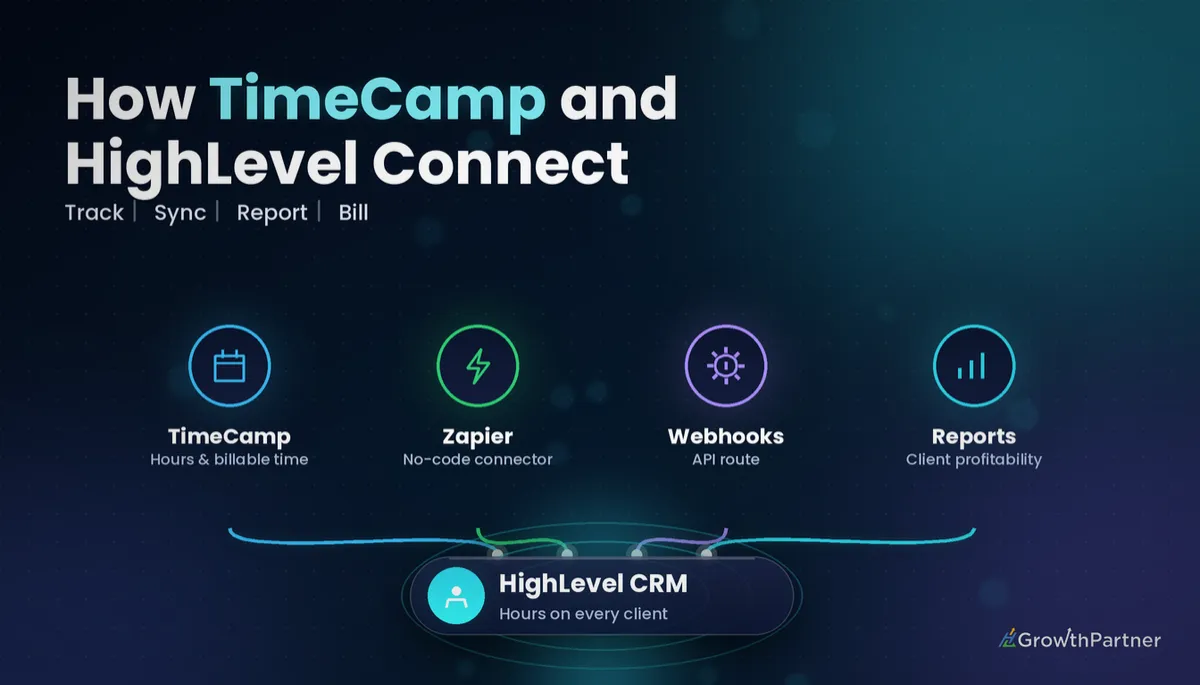
A GoHighLevel TimeCamp integration puts the hours your team tracks against each client right beside the client record you already work from in HighLevel. TimeCamp is a time tracker with automatic tracking, billable rates, invoicing and attendance, so it holds exactly the numbers account managers keep asking for.
There is no one-click connection, though. This guide is part of our time-tracking integration series, and TimeCamp is one of the easier trackers to connect because it has a working Zapier app.
| Native TimeCamp app in HighLevel marketplace | None found at time of writing (check your own App Marketplace) |
| TimeCamp Starter (TimeCamp pricing, Nov 2026) | US$3.99/user/month annually or US$5.49 monthly |
| TimeCamp Premium (TimeCamp pricing, Nov 2026) | US$6.99/user/month annually or US$9.99 monthly |
| TimeCamp Ultimate (TimeCamp pricing, Nov 2026) | US$9.99/user/month annually or US$13.99 monthly |
| Zapier support | Yes: triggers for new task/project and new time entry; actions to create a project, task or time entry |
| TimeCamp API | Free on all plans, per TimeCamp's help centre |
| HighLevel plans (HighLevel pricing, Nov 2026) | Starter US$97/month, Unlimited US$297/month |
Is there a native HighLevel TimeCamp integration?
Not at the time of writing. We found no native TimeCamp app in the HighLevel App Marketplace, and HighLevel is not among the tools TimeCamp connects to out of the box. Check the App Marketplace in your own account before you build, because listings change.
What TimeCamp does have is an app on Zapier, plus listings on no-code platforms such as Integrately and viaSocket that pair it with GoHighLevel. It also has a documented API that is free on every plan. That gives you three realistic routes, and the right one depends on how much logic you need.
What a GoHighLevel TimeCamp integration can realistically do
TimeCamp records time; HighLevel runs your pipeline and client records. Move a few useful facts between them, not mirror both systems.
Realistic automations
- Won deal creates the project: when an opportunity is marked Won, create a matching TimeCamp project, and optionally starter tasks, so the team tracks from day one.
- Hours flow back to the client: push a per-client total from TimeCamp into a HighLevel contact custom field or note, so account managers see effort without opening another tool.
- Retainer alerts: when logged hours pass a threshold you set, notify the account manager and create a follow-up task before the overrun becomes a refund conversation.
What it will not do
Do not expect TimeCamp timesheets, approvals, attendance records or computer activity data to appear inside HighLevel. Those stay in TimeCamp. Move summaries, not raw tracking data, into your CRM, because more people can see a CRM record than a timesheet.
The Won-deal trigger is the backbone of most builds. Our walkthrough of the HighLevel opportunity status changed trigger covers the filters that stop it firing on lost or abandoned deals.
Three ways to connect TimeCamp to HighLevel
Each route trades setup speed against control.
| Route | How it works | Effort | Best for |
|---|---|---|---|
| Zapier (or Integrately, viaSocket) | HighLevel and TimeCamp both connect to the platform; a Zap or flow passes data between them | Low | Agencies without a developer who want something live this week |
| TimeCamp API + HighLevel webhooks | HighLevel workflow webhooks talk to TimeCamp's API through a small script or automation server | Medium to high | Teams with technical help who need custom logic or two-way sync |
| Scheduled CSV export | Export TimeCamp reports and update HighLevel fields by hand or import on a schedule | Low setup, ongoing admin | Small teams with a handful of retainers |
For most agencies, Zapier is the sensible starting point with TimeCamp, because the triggers and actions you need already exist. Move to webhooks once you know which fields genuinely matter.
Step-by-step: connect TimeCamp to HighLevel with Zapier
According to Zapier's TimeCamp listing, the app offers two triggers (New Task or Project, New Time Entry) and actions to create a project, create a task and create a time entry. The time entry action accepts a name and date, plus optional task, start and end time, duration, billable flag and note.
Zap 1: Won deal creates a TimeCamp project
- In TimeCamp, have an Administrator enable the Zapier integration; TimeCamp's help centre notes only the account Administrator can do this.
- In Zapier, connect your HighLevel account and choose the trigger that fires when an opportunity status changes or moves to your Won stage.
- Add a filter step so only Won opportunities continue.
- Add the TimeCamp action Create Project, naming it with the client's company or contact name exactly as it appears in HighLevel.
- Optionally add Create Task steps for your standard onboarding work.
- Test with a dummy contact and opportunity before turning it on.
Zap 2: hours back into HighLevel
- Create a contact custom field in HighLevel, such as "Hours this month", plus a field for the TimeCamp project name if your naming is inconsistent.
- In Zapier, use the TimeCamp New Time Entry trigger, or better, a scheduled Zap that sums entries per project.
- Find the matching HighLevel contact, then update the custom field or add a note with the total.
Our GoHighLevel Zapier integration guide explains how HighLevel's Zapier connection authenticates and which plan tiers Zapier needs for multi-step Zaps.
The integration is only as good as your naming. If a client is "Smith Plumbing" in HighLevel and "Smith P - SEO" in TimeCamp, no automation will match them reliably.
Not on HighLevel yet? Start with a free 30-day trial here — long enough to build everything in this guide before you pay a cent.
Step-by-step: the webhook and TimeCamp API route
This route gives you full control and avoids per-task connector charges at volume. HighLevel workflows can send outbound webhooks and receive inbound ones, and TimeCamp offers a REST API. A small middleware layer sits between them.
HighLevel to TimeCamp
- In a HighLevel workflow, start with your Won trigger.
- Add a webhook action that sends contact, company and opportunity details to your middleware URL.
- Your middleware calls TimeCamp's API to create the project or task. TimeCamp's help centre says you find your API token at the bottom of your Profile Settings page; check the developer documentation for current endpoints and authentication.
TimeCamp to HighLevel
- Create a HighLevel workflow with an inbound webhook trigger and copy the URL it generates.
- Schedule your middleware to pull time entries from TimeCamp's API for each active client project and total them.
- Post the totals to the inbound webhook URL with an identifier such as the contact email so HighLevel matches the right record.
- In the workflow, update the hours field, add a note, and branch on your threshold to alert the account manager.
Mind the rate limits. TimeCamp's help centre states API limits depend on your plan, with the Free plan capped at 360 requests per hour and 60 per minute, so pull daily summaries rather than polling every few minutes. If webhooks are new to you, our guide to GoHighLevel webhooks: inbound and outbound setup walks through testing payloads and mapping fields.
The manual CSV route: when it is enough
With only a few retainers, a weekly TimeCamp report export used to update one HighLevel custom field can be enough. Make it a recurring internal task in HighLevel so it never slips, and automate only once the admin genuinely hurts.
GoHighLevel TimeCamp integration cost in 2026
Your total has three parts: TimeCamp seats, your HighLevel plan, and the connection itself.
| Item | Price (USD) | Notes |
|---|---|---|
| TimeCamp Free | US$0 | Unlimited users and projects (TimeCamp, Nov 2026) |
| TimeCamp Starter | US$3.99/user/month annually or US$5.49 monthly | TimeCamp pricing, Nov 2026 |
| TimeCamp Premium | US$6.99/user/month annually or US$9.99 monthly | Adds billable time and budgets (TimeCamp, Nov 2026) |
| TimeCamp Ultimate | US$9.99/user/month annually or US$13.99 monthly | Adds billable rates, expenses and timesheet approvals (TimeCamp, Nov 2026) |
| TimeCamp Enterprise | Custom quote | Aimed at larger teams |
| HighLevel Starter | US$97/month | Up to 3 sub-accounts (HighLevel pricing, Nov 2026) |
| HighLevel Unlimited | US$297/month | Unlimited sub-accounts (HighLevel pricing, Nov 2026) |
| Zapier or connector | Varies | Tiered by tasks or operations; multi-step Zaps need a paid plan |
| Middleware (webhook route) | Varies | Hosting is usually modest; developer time is the real cost |
TimeCamp charges per user, so seat count matters more than tier for most agencies. Feature placement between tiers shifts from time to time, so confirm on the official TimeCamp pricing page and HighLevel pricing page before you buy.
HighLevel TimeCamp use cases for agencies
- Retainer health view: hours used sits on each contact, so account managers can sort clients by effort and spot over-serviced accounts.
- Scope creep early warning: a workflow alerts the account manager when a client's hours run high for the month.
- Faster onboarding: a Won deal sets up the TimeCamp project automatically, so the first hour of work is tracked.
- Monthly reports with effort: the hours figure feeds the reports you already send clients.
That last one pairs well with our approach to monthly agency client reporting in HighLevel, where a single hours field adds a lot of credibility. If you are still choosing a tracker, the Clockify and HighLevel setup guide is worth comparing, as Clockify suits teams wanting a generous free tier.
Common mistakes to avoid
- Assuming a native HighLevel app exists without checking your own App Marketplace first.
- Using different client names in HighLevel and TimeCamp, so automations cannot match records.
- Triggering on every new time entry, which burns Zapier tasks and API limits; send daily or weekly totals instead.
- Syncing timesheets or activity data into the CRM instead of summary hours.
- Switching on TimeCamp's automatic computer activity tracking without telling staff what is recorded and checking local workplace surveillance rules.
- Building the webhook route with no error logging, so an hours field quietly stops updating.
Or if you just need the software first: grab the 30-day HighLevel trial and book us when you're ready to scale it.
Frequently asked questions
Does GoHighLevel have a native TimeCamp integration?
At the time of writing we found no native TimeCamp app in the HighLevel App Marketplace, and HighLevel does not appear among TimeCamp's built-in integrations. Marketplace listings change, so search your own App Marketplace before building. Without a native app, the practical routes are Zapier or another connector, TimeCamp's API with HighLevel webhooks, or a scheduled CSV export.
Can I connect TimeCamp to HighLevel with Zapier?
Yes. TimeCamp has an app on Zapier with triggers for a new task or project and a new time entry, and actions to create a project, create a task and create a time entry. HighLevel also connects to Zapier, so a Zap can sit between the two. TimeCamp's help centre notes that only an account Administrator can enable the integration.
How much does TimeCamp cost in 2026?
According to TimeCamp's own pricing pages as of November 2026, Starter is US$3.99 per user per month billed annually or US$5.49 monthly, Premium is US$6.99 annually or US$9.99 monthly, and Ultimate is US$9.99 annually or US$13.99 monthly. There is also a free plan, and Enterprise is quoted on request. Confirm current rates on TimeCamp's pricing page before you buy.
Does the TimeCamp API cost extra?
No. TimeCamp's help centre says the API is free on all subscription plans, and you find your API token at the bottom of your Profile Settings page. Request limits depend on your plan; TimeCamp lists 360 requests per hour and 60 per minute on the Free plan.
Can TimeCamp hours show on a HighLevel contact?
Yes, with a Zapier, connector or webhook build you can write tracked hours into a HighLevel contact custom field or add them as a note. The cleanest approach is to send a summary total per client on a schedule rather than every individual time entry. Detailed timesheets and activity data should stay in TimeCamp.
What is the easiest way to connect TimeCamp to HighLevel?
For most agencies without a developer, Zapier is the easiest route because both apps already have Zapier connections. Third-party platforms such as Integrately and viaSocket also list a GoHighLevel and TimeCamp connection. Start with one automation, such as creating a TimeCamp project when a deal is won, and test it before adding more.
Which HighLevel plan do I need for a TimeCamp integration?
Most builds rely on standard workflows plus a Zapier connection or webhooks, which agencies typically run on Starter or Unlimited. According to HighLevel's pricing page as of November 2026, Starter is US$97 per month for up to 3 sub-accounts and Unlimited is US$297 per month. Check which workflow and API features are available on your plan in your own account.
Related Articles on HL Growth Partner
More time-tracking integrations
 GoHighLevel Time Doctor Integration: Setup & Cost (2026)
 GoHighLevel Hubstaff Integration: Setup & Cost (2026)
 GoHighLevel Toggl Track Integration: Setup & Cost (2026)
Billing-focused trackers
 GoHighLevel Harvest Integration: Setup & Cost (2026)
 GoHighLevel Everhour Integration: Setup & Cost (2026)