GoHighLevel Toggl Track Integration: Setup & Cost (2026)
 By Dr Priya Jaganathan, GoHighLevel Certified Admin · HL Growth Partner, Australia · Updated 19 November 2026 · 9 min read
How to connect Toggl Track to HighLevel without a native integration, with two working recipes, a field map and an honest cost breakdown for agencies and consultants.
Some links below are affiliate links — if you sign up through them, HL Growth Partner may earn a commission at no extra cost to you. It never changes what we recommend.
A GoHighLevel Toggl Track integration lets your billable hours live next to the client record in HighLevel instead of in a separate tab nobody checks. The catch is simple: there is no native HighLevel–Toggl integration, so you build the bridge yourself.
This guide is the next instalment in our integration setup and cost series, following Harvest and Clockify. I'll show you what is worth automating, two recipes to connect Toggl to HighLevel, the fields to map, what it really costs and the limits that trip people up.
| Native HighLevel–Toggl integration | None; build it with Zapier, Make, n8n or webhooks |
| Toggl Track Free | Up to 5 users (Toggl) |
| Toggl Track Starter | US$9/user/month billed annually, US$12 monthly (Toggl support, July 2026) |
| Toggl Track Premium | US$18/user/month billed annually, US$20 monthly (Toggl support, July 2026) |
| Toggl webhooks on Free | 1 webhook with up to 3 events (Toggl support docs) |
| HighLevel plans | Starter US$97/month, Unlimited US$297/month (HighLevel pricing page) |
Is there a native GoHighLevel Toggl Track integration?
No. HighLevel has no built-in Toggl connector in its integrations settings, and Toggl does not list HighLevel as a native integration either. Anyone telling you to "just switch it on" is describing something that doesn't exist.
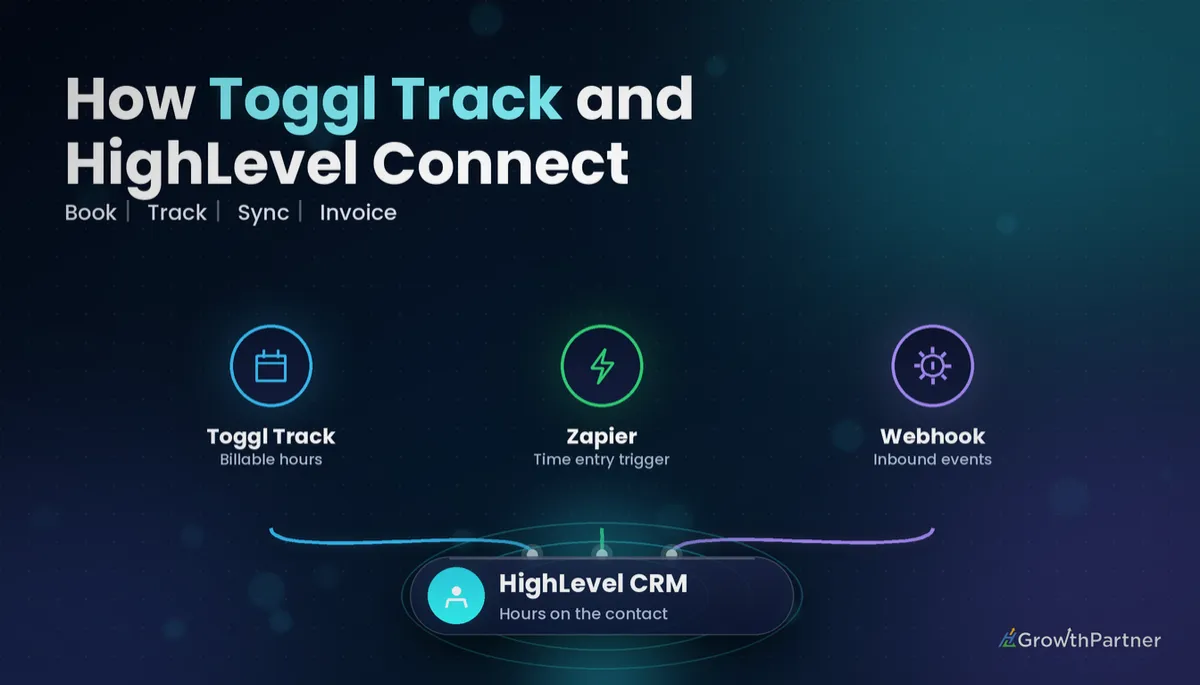
What you do have is a solid set of building blocks. Toggl offers an API, webhooks and a Zapier integration, and HighLevel Workflows include an Inbound Webhook trigger plus Webhook and Custom Webhook actions.
That gives you four realistic ways to connect Toggl to HighLevel:
- Zapier: the quickest no-code route, using Toggl's own Zapier integration.
- Make: better when you need routers, filters and data reshaping in one scenario.
- n8n: self-hosted or cloud, ideal if you are comfortable with JSON and want control.
- Direct webhooks: Toggl webhooks into a HighLevel Inbound Webhook trigger, and HighLevel outbound webhooks into the Toggl API.
If you already followed our GoHighLevel Harvest integration setup guide, the pattern will feel familiar. Toggl is lighter on invoicing and stronger on simple timers, which changes what you automate.
Where connecting Toggl to HighLevel actually pays off
Most agencies and consultants don't need every time entry in the CRM. They need a few signals that change how they sell, deliver and bill.
Log billable hours against a contact or opportunity
When a team member stops a timer on a client project, the duration rolls up into a "Hours logged" custom field on the HighLevel contact or opportunity. Account managers see effort next to deal value without opening Toggl.
Create a Toggl project when an opportunity is won
Moving an opportunity to "Won" in your pipeline fires a workflow that creates a matching Toggl client and project. Your delivery team starts tracking on day one, with naming that matches the CRM.
Notify the team when a budget is close
Store the sold hours on the opportunity, compare them with hours logged, and send an internal notification or Slack message at 80 per cent. Scope creep is cheaper to raise at 80 per cent than to absorb at 140.
Push hours into an invoice
At month end, total billable hours per client and use them to prepare a HighLevel invoice or pass them to your accounting tool. Many of our clients pair this with the GoHighLevel Xero integration so the numbers land in the books too.
Recipe 1: connect Toggl to HighLevel with Zapier
Zapier is where I start most clients because Toggl maintains its own Zapier app. Per Toggl's support docs, the integration authenticates with your Toggl API token, and Toggl notes that Zapier connects to more than 6,000 apps.
- Prepare HighLevel. Create the custom fields from the mapping table below on contacts or opportunities, and decide which record is the source of truth for each client.
- Get your Toggl API token. Find it in your Toggl profile settings and keep it in a password manager, not a shared doc.
- Create a Zap with a Toggl trigger. Choose the time-entry trigger that fits your process; check the exact trigger list in Zapier, as app options change.
- Add a filter. Only continue when the entry is billable and belongs to a client project, so internal admin time stays out of the CRM.
- Find the HighLevel record. Search for the contact by email or a stored Toggl client ID, then update the custom field with the new hours.
- Test with one entry. Run a short test timer, confirm the field updated, then switch the Zap on.
For the HighLevel side of Zapier, including connection and task usage, see our GoHighLevel Zapier integration guide. The reverse flow, won opportunity to new Toggl project, uses a HighLevel trigger and a Toggl create action in the same way.
Don't sync every timer. Sync the three numbers that change a decision: hours sold, hours used and hours billable this month.
Recipe 2: the webhook route between Toggl and HighLevel
If you want fewer moving parts or lower per-task costs, go direct. This route uses Toggl webhooks inbound to HighLevel and HighLevel outbound webhooks to the Toggl API.
Toggl to HighLevel
- In HighLevel, create a workflow with the Inbound Webhook trigger and copy the webhook URL it gives you.
- In Toggl, create a webhook subscription pointing to that URL, and choose the time-entry events you care about.
- Send a test event so HighLevel captures a sample payload, then map the incoming fields.
- Add a step to find the contact or opportunity and update your custom fields.
HighLevel to Toggl
- Trigger the workflow on the opportunity stage change you use for "Won".
- Add a Webhook or Custom Webhook action that calls the Toggl API to create a project, passing your API token in the authorisation header.
- Write the returned Toggl project ID back to the opportunity so later entries can be matched.
The full Toggl endpoints and payload formats are in the official Toggl Track developer docs. Our walkthrough of GoHighLevel inbound and outbound webhooks covers the HighLevel half step by step.
One caution: some workflow actions are premium and may incur usage charges. Check your account's workflow settings and billing before you go live, because it varies by plan and agency setup.
Toggl to HighLevel field mapping table
Create these custom fields in HighLevel before you build anything. Naming them consistently makes every recipe above easier to maintain.
| Toggl field | HighLevel custom field | Field type | Notes |
|---|---|---|---|
| Client name / ID | Toggl Client ID | Single-line text | The matching key; store it on the contact |
| Project ID | Toggl Project ID | Single-line text | Written back when a project is created |
| Duration | Hours Logged | Number | Convert from the API's unit to hours before writing |
| Billable flag | Billable Hours This Month | Number | Only add entries marked billable |
| Description | Last Task Worked | Single-line text | Handy context for account managers |
| Stop time | Last Time Entry Date | Date | Flags quiet accounts |
| Estimated or sold hours | Hours Sold | Number | Set from the opportunity, used for budget alerts |
Keep the matching key boring and unique. Email addresses change; a stored Toggl client ID does not.
GoHighLevel Toggl Track integration cost in 2026
Your total cost has three parts: Toggl seats, the connector and HighLevel itself. Toggl prices are per user, so the team size matters more than anything else.
| Component | Price | Source |
|---|---|---|
| Toggl Track Free | US$0, up to 5 users | Toggl |
| Toggl Track Starter | US$9/user/month annually or US$12 monthly | Toggl support article, July 2026 |
| Toggl Track Premium | US$18/user/month annually or US$20 monthly | Toggl support article, July 2026 |
| Toggl Track Enterprise | Custom pricing | Toggl |
| Zapier, Make or n8n | Depends on plan and task volume; check current pricing | Connector's pricing page |
| Direct webhooks | No connector fee; HighLevel premium actions may add usage charges | Check your account |
| HighLevel Starter | US$97/month | HighLevel pricing page |
| HighLevel Unlimited | US$297/month | HighLevel pricing page |
As a rule of thumb, small teams on the Free plan can test the whole idea cheaply. Once you need more webhooks, more events or more users, the upgrade is usually driven by Toggl limits rather than the connector.
Not on HighLevel yet? Start with a free 30-day trial here — long enough to build everything in this guide before you pay a cent.
Limits to watch when you connect Toggl to HighLevel
Toggl's webhook allowance depends on your plan. According to Toggl's support docs, the Free plan allows 1 webhook with up to 3 events, which is enough for a single time-entry flow but not much more.
- API rate limits. Toggl rate-limits API requests per user per hour on the Free, Starter and Premium plans, and the limits are tight on lower plans. Avoid polling; let webhooks push changes instead.
- Running timers. An entry that is still running has no final duration, so only act when the timer stops.
- Edited entries. People fix their timesheets later. Decide whether you add to totals or recalculate them, or your hours drift.
- Workflow usage. Every inbound event runs a HighLevel workflow; premium actions may carry usage charges, so check your account.
- Token ownership. An API token belongs to a person. If that person leaves, the integration breaks, so use a dedicated admin account where possible.
If you are still choosing a timer, our GoHighLevel Clockify integration breakdown compares a similar build with different limits.
Common mistakes to avoid
- Assuming a native connector exists and losing a week looking for a toggle in Settings.
- Matching records on client name instead of a stored ID, so a typo creates orphaned hours.
- Syncing non-billable and internal time into client records, which inflates effort reports.
- Writing raw duration values into HighLevel without converting them to hours.
- Building on a personal API token that disappears when the staff member leaves.
- Going live without a test entry and a check of premium action charges in your account.
Or if you just need the software first: grab the 30-day HighLevel trial and book us when you're ready to scale it.
Frequently asked questions
Does GoHighLevel have a native Toggl Track integration?
No. There is no native HighLevel–Toggl integration. You connect them through Zapier, Make, n8n, or by pairing Toggl webhooks with a HighLevel Inbound Webhook trigger and HighLevel outbound webhooks with the Toggl API.
What is the easiest way to connect Toggl to HighLevel?
Zapier is usually the easiest, because Toggl maintains its own Zapier integration that authenticates with your Toggl API token. You pick a Toggl trigger, find the matching HighLevel contact or opportunity, and update a custom field with the hours.
How much does Toggl Track cost in 2026?
According to Toggl's support article updated July 2026, Starter costs US$9 per user per month billed annually or US$12 monthly, and Premium costs US$18 per user per month billed annually or US$20 monthly. There is a Free plan for up to 5 users, and Enterprise is custom priced.
Can I use Toggl webhooks with HighLevel on the Free plan?
Yes, within limits. Toggl's support docs say the Free plan allows 1 webhook with up to 3 events, which is enough to send time-entry events to a single HighLevel Inbound Webhook workflow.
Can HighLevel create a Toggl project when a deal is won?
Yes. Trigger a HighLevel workflow when the opportunity moves to your won stage, then use a Webhook or Custom Webhook action, or a Zapier, Make or n8n step, to create the project through the Toggl API. Store the returned project ID on the opportunity for matching later.
Are there extra HighLevel costs for webhook actions?
Possibly. Some HighLevel workflow actions are premium and may incur usage charges, and this varies by account. Check the workflow and billing settings in your account before going live.
Will Toggl API rate limits affect my integration?
They can. Toggl rate-limits API requests per user per hour on the Free, Starter and Premium plans, and the limits are tight on lower plans. Use webhooks to push changes rather than polling the API on a schedule.