GoHighLevel Review Received Trigger: Setup Guide (2026)
 By Dr Priya Jaganathan, GoHighLevel Certified Admin · HL Growth Partner, Australia · Updated 24 November 2026 · 8 min read
How to set up the GoHighLevel Review Received trigger so every new review is sorted by rating, routed to the right person and acted on within minutes, not weeks.
The GoHighLevel Review Received trigger starts a workflow the moment a new review lands from any review platform connected to your sub-account. It is the piece most agencies forget: they automate the review request, then leave the reviews themselves sitting in the Reputation tab until someone happens to log in.
This guide walks through what the trigger actually gives you, how to filter it, the four workflows we build for almost every local-business client, and the traps that make it look broken when it isn't.
| Trigger name | Review Received (Workflows → Add New Trigger) |
| Fires when | A new review arrives from a connected review platform |
| Platforms | Originally Google and Facebook; extended to all integrated review platforms |
| Filters | Source (platform), rating, spam status |
| Contact attached? | No – the review is not linked to a contact record |
| Lookalike to avoid | Product Review Submitted (e-commerce store reviews) |
What the Review Received trigger does in GoHighLevel (and what it doesn't)
When a review is posted on a platform you've connected under Reputation Management, HighLevel picks it up and fires any workflow that uses this trigger. HighLevel's own changelog notes the trigger now supports all integrated review platforms, not just the original Google and Facebook pair.
The trigger hands the workflow three useful pieces of data: the rating, the platform source and the spam status. Those are also the three filters you can set on the trigger itself.
What it does not hand you is a contact. A Google reviewer is a Google account, not a row in your CRM, so the review is not tied to a contact record.
That single detail decides how you design every Review Received workflow. Actions that need a contact – Send SMS, Send Email to the contact, Add Tag – have nobody to act on. Actions aimed at your team, such as internal notifications and outbound webhooks, work perfectly.
Review Received vs Product Review Submitted
HighLevel also has a Product Review Submitted trigger. That one belongs to the e-commerce store and fires when a shopper reviews a product on a HighLevel store page.
If your client runs a clinic, a trade business or a salon, you want Review Received. If they sell physical products through a HighLevel store, they may want both.
Before you build: get the review sources connected properly
The trigger can only fire on reviews HighLevel can see. Before you open the workflow builder, check that the sub-account's review platforms are actually connected and syncing.
- Connect the Google Business Profile under Settings → Integrations, and confirm the right location is selected (multi-location brands get this wrong constantly).
- Connect the Facebook page if the business collects recommendations there.
- Open Reputation → Reviews and confirm recent reviews are appearing. If the list is empty, the trigger will be too.
We cover the connection step by step in our Google Business Profile setup guide for HighLevel, including the location-mismatch issue that silently stops syncing.
How to set up the Review Received trigger, step by step
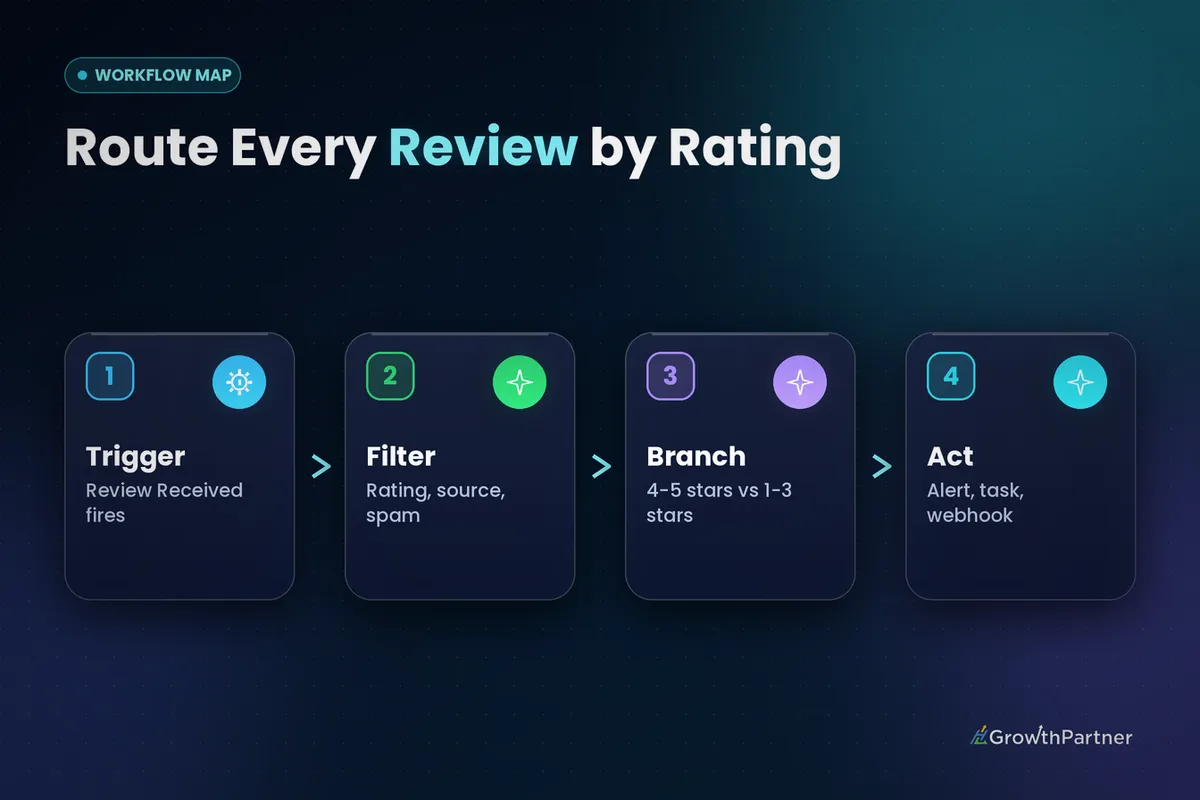
The setup itself takes about five minutes. The thinking about what should happen next takes longer, so do that first.
1. Create the workflow
Go to Automation → Workflows, click Create Workflow and start from scratch. Name it something your team will recognise in six months, such as "REP | New review | Route by rating".
2. Add the trigger
Click Add New Trigger, search for "Review Received" and select it. Give the trigger a clear name too; it shows up in execution logs.
3. Add filters
Add filters only where they earn their place:
- Source – restrict to Google if you only want to act on Google reviews.
- Rating – useful when you build one workflow per rating band instead of branching inside one workflow.
- Spam status – exclude reviews flagged as spam so your team isn't paged at 11pm for a bot.
4. Branch on rating
If you keep one workflow, add an If/Else step straight after the trigger. A two-branch split (4–5 stars vs 1–3 stars) covers most businesses; some clients prefer a separate branch for exactly 3 stars because those reviewers are often the easiest to win back.
5. Add the actions, then test and publish
Add the internal actions for each branch (covered next), save, switch the workflow to Publish, and watch the Execution Logs the next time a review arrives.
A review request workflow gets you more reviews. A Review Received workflow decides what those reviews are worth to the business.
Four Review Received workflows worth building for every client
These are the builds we deploy most often for Australian local businesses. All four work without a contact, which is why they suit this trigger.
| Workflow | Filter / branch | Key actions | Who benefits |
|---|---|---|---|
| Negative review alert | Rating 1–3 | Internal notification (SMS + email) to the owner or practice manager | Clinics, trades, hospitality |
| Win celebration | Rating 5 | Internal notification to the team or a Slack channel via webhook | Any team that runs on morale |
| Reputation log | All ratings | Custom webhook to Google Sheets, Airtable or a reporting tool | Agencies reporting monthly |
| Multi-location routing | Source + branch per location | Notify the manager for that location only | Franchises and groups |
Negative review alert (the one that pays for itself)
Speed matters most on a bad review. Send an internal SMS and email to whoever can actually respond, with the rating and platform in the message, and a link to the Reputation tab.
Make the alert specific: "New 2-star Google review – respond within 24 hours" gets action; "New review received" gets ignored.
Win celebration
Five-star reviews rarely get seen by the staff who earned them. Pushing them into a team channel takes one webhook step and does more for retention than another staff meeting.
Reputation log for reporting
If you send clients a monthly report, a webhook that writes every review to a sheet gives you a clean time series. It also protects you if a platform connection drops, because the gap in the log is obvious.
Pairing with Reviews AI
HighLevel's Reviews AI can draft or post replies on its own. The trigger complements it rather than replacing it: let AI handle the routine thank-yous, and use the workflow to put a human on every low rating. Our Reviews AI walkthrough covers the reply settings.
Connecting Review Received to the rest of your automation
The trigger is the back half of a reputation system. The front half is the request: the SMS or email that asks a happy customer for a review after a job or appointment.
If you haven't built that yet, start with our guide to automating Google review requests with workflows, then add Review Received once reviews are flowing.
For follow-up on a bad review, many teams want a task on someone's list rather than just a notification. Because there's no contact on this trigger, the cleanest route is to notify the manager, have them find the customer in the CRM, and let a contact-based workflow take over from there – for example one built on the Task Added trigger so service-recovery tasks get chased automatically.
For the official field list, see HighLevel's help article on review workflow triggers.
Common mistakes to avoid
- Using contact actions. Send SMS or Add Tag after Review Received has no contact to act on. Use internal notifications and webhooks instead.
- Testing with an old review. The trigger fires on new reviews only. Existing reviews won't run through a workflow you just published.
- No spam filter. Without it, fake reviews page your client's owner just like real ones.
- Vague alert copy. Put the rating, platform and response deadline in the notification itself.
- Wrong Google location. If the sub-account is linked to the wrong Business Profile location, the trigger stays silent and looks broken.
- Confusing it with Product Review Submitted. That trigger is for store product reviews, not Google or Facebook.
Frequently asked questions
What is the Review Received trigger in GoHighLevel?
Review Received is a workflow trigger that fires when a new review arrives from a review platform connected to the sub-account. It passes the rating, the platform source and the spam status into the workflow, so you can route each review to the right person automatically.
Does the Review Received trigger work with platforms other than Google?
Yes. The trigger originally covered Google and Facebook reviews, and HighLevel has since extended it to all review platforms integrated with the account. You can use the Source filter to limit a workflow to a single platform.
Can I send the reviewer an SMS from a Review Received workflow?
Not directly. The review is not linked to a contact record, so contact-based actions such as Send SMS or Add Tag have no one to act on. Use internal notifications and webhooks, then follow up from the contact record once your team identifies the customer.
Why isn't my Review Received workflow firing?
The usual causes are an unpublished workflow, a review platform that isn't connected or is linked to the wrong location, or testing with a review that already existed. The trigger only fires on new reviews, so check Reputation → Reviews to confirm new ones are syncing.
Can I filter Review Received by star rating?
Yes. Rating is one of the trigger's filters, alongside source and spam status. Many agencies use one workflow with an If/Else branch on rating, while others build separate workflows for low and high ratings.
What is the difference between Review Received and Product Review Submitted?
Review Received fires on reviews from connected platforms such as Google and Facebook. Product Review Submitted is an e-commerce trigger that fires when a customer reviews a product in a HighLevel store.
Should I use Reviews AI or a Review Received workflow?
Use both. Reviews AI handles replies, while a Review Received workflow alerts your team, logs reviews for reporting and makes sure a human handles every low rating quickly.
Related Articles on HL Growth Partner
Reputation and reviews
 GoHighLevel Reputation Management: Google Reviews on Autopilot (2026)
 GoHighLevel vs Podium: Reviews, SMS & Cost (2026)
 GoHighLevel Review Request Search & Filters