GoHighLevel Zoho Projects Integration: Setup & Cost (2026)
 By Dr Priya Jaganathan, GoHighLevel Certified Admin · HL Growth Partner, Australia · Updated 10 November 2026 · 8 min read
How to connect GoHighLevel to Zoho Projects so a won deal becomes a ready-to-run project automatically, which bridge to use, and what the whole stack really costs per month.
Some links below are affiliate links — if you sign up through them, HL Growth Partner may earn a commission at no extra cost to you. It never changes what we recommend.
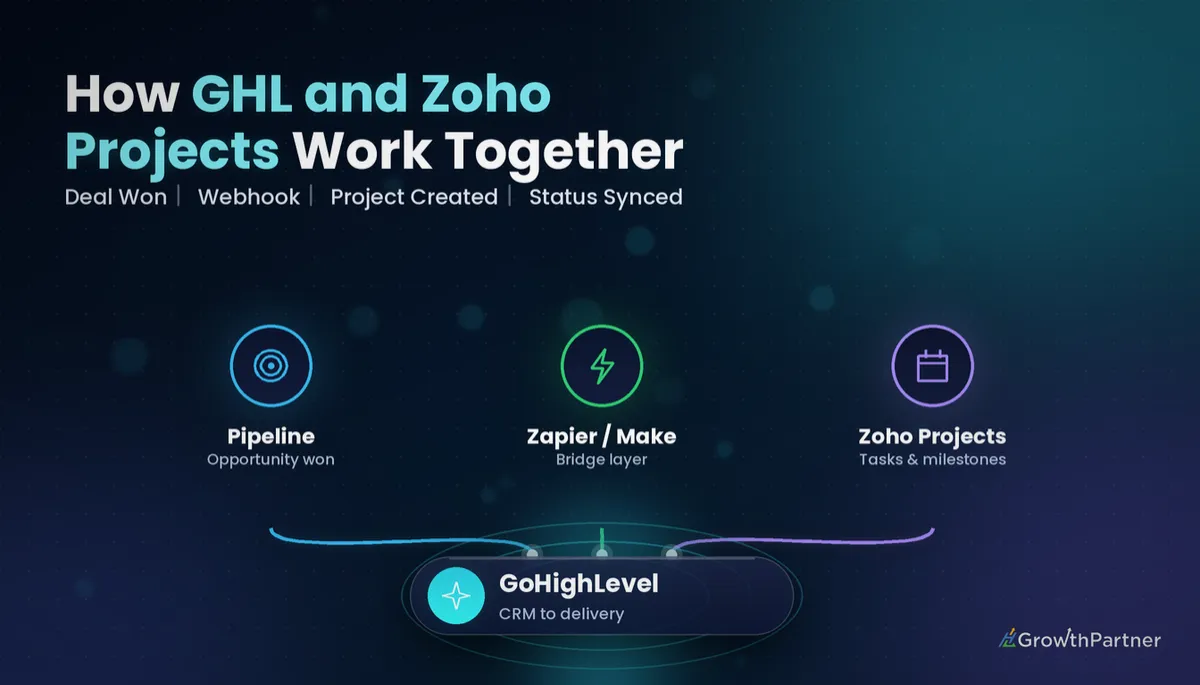
A GoHighLevel Zoho Projects integration closes the gap between selling the work and delivering it. When an opportunity is marked Won in HighLevel, the client's project, tasks and owner should appear in Zoho Projects without anyone retyping a thing.
HighLevel does not ship a built-in Zoho Projects connector at the time of writing, so the link runs through a bridge: Zapier, Make, n8n or webhooks. This guide compares each route, walks through a working setup and breaks down the real monthly cost, in the same format as our GoHighLevel Asana integration guide.
| Native GHL connector | None at the time of writing; use a bridge |
| Zoho Projects on Zapier | Yes, listed as an available app |
| Zoho Projects Premium | From US$4/user/month billed annually (US$5 monthly) |
| Zoho Projects Enterprise | From US$9/user/month billed annually (US$10 monthly) |
| Premium user cap | 50 users |
| Zoho Projects webhooks | Paid plans only, not the free plan |
Zoho Projects pricing as listed by Capterra and Tech.co in 2026; webhook availability from Zoho's own plan comparison. Always confirm on Zoho's pricing page before quoting a client.
Why connect GoHighLevel and Zoho Projects at all?
HighLevel is excellent at the front half of the client journey: capturing leads, nurturing them, booking calls and closing deals. It is not designed to run a 40-task delivery plan with dependencies and timesheets.
Zoho Projects is built for that second half. Gantt charts, task dependencies, timesheets and milestones are its home ground, and it suits teams already using other Zoho apps.
The integration's job is the handover. Without it, someone has to notice a won deal, open Zoho, create the project and copy the client details, and that manual step is where projects start late.
Who this setup suits
- Agencies delivering websites, campaigns or GHL builds with repeatable task lists.
- Consultancies and accountants who already live in the Zoho ecosystem.
- Service businesses using HighLevel for sales and Zoho for operations and time tracking.
Four ways to connect GoHighLevel to Zoho Projects
Each route trades cost against flexibility. The table below is how we choose for clients.
| Route | Effort | Running cost | Best for |
|---|---|---|---|
| Zapier | Low | Scales with task volume | Simple "deal won → project" flows |
| Make | Medium | Usually lower per operation | Multi-step flows with templates and routers |
| n8n | Medium to high | Self-host or cloud plan | Technical teams wanting full control |
| Webhooks + API | High | Hosting only | Custom builds handled by a developer |
Zapier
Zapier is the quickest start. Use the LeadConnector (HighLevel) app as the trigger and Zoho Projects as the action. Our GoHighLevel Zapier integration guide covers connecting the HighLevel side.
Watch the plan limits: Zapier's free plan only runs two-step Zaps, so any flow that creates a project and then adds tasks needs a paid plan.
Make
Make handles branching better. A router can create a different project template depending on the service sold, which is hard to do cleanly in a single Zap. See our Make.com integration walkthrough for the HighLevel connection steps.
n8n and direct webhooks
Zoho's API uses OAuth, so a raw HighLevel outbound webhook cannot call it on its own. You need a middle layer to hold the token. n8n does this well if your team is comfortable maintaining it.
The best integration is the one your team can still fix at 4pm on a Friday. Pick the bridge you can maintain, not the one that looks cleverest in a demo.
How to set up the GoHighLevel to Zoho Projects integration
Here is the flow we build most often: an opportunity moves to Won, and a templated project appears in Zoho Projects with the client as the project name.
Step 1: Prepare a project template in Zoho Projects
Build one template per service with its task lists, milestones and default owners. Templates are what make the automation worth it; creating an empty project saves very little time.
Step 2: Standardise the HighLevel data
Make sure the opportunity carries what the project needs: company name, service sold (a dropdown custom field works best), start date and account manager. Garbage in a custom field becomes garbage in every project.
Step 3: Build the HighLevel workflow
Create a workflow with the Opportunity Status Changed trigger filtered to Won, or Pipeline Stage Changed filtered to your "Closed Won" stage. Our guide to GoHighLevel pipeline automation explains which to use.
Add a tag such as "zoho-project-requested" so you can audit later which deals were sent across.
Step 4: Create the project in your bridge
In Zapier or Make, trigger on the HighLevel event, then use the Zoho Projects "create project" action with your template. Map company name, start date and owner. Add a second step to post the HighLevel contact link into the project description so the team can jump back to the CRM.
Step 5: Send status back to HighLevel (optional)
On a paid Zoho plan, a Zoho Projects webhook can fire when a milestone completes. Point it at a HighLevel Inbound Webhook trigger to move the opportunity to "Delivered" or start a review request. Our webhooks setup guide covers the payload mapping.
Step 6: Test end to end
Move a test opportunity to Won, confirm the project appears with the right template, then complete a milestone and check the opportunity updates. Run the test twice to make sure you do not get duplicate projects.
GoHighLevel and Zoho Projects: the true monthly cost
The cost has three parts: HighLevel, Zoho Projects seats, and the bridge. For a five-person delivery team, the Zoho side is modest.
| Component | Example choice | Indicative cost |
|---|---|---|
| HighLevel | Starter / Unlimited / $497 plan | US$97 / US$297 / US$497 per month |
| Zoho Projects | Premium, 5 users, annual | About US$20 per month (5 × US$4) |
| Zoho Projects | Enterprise, 5 users, annual | About US$45 per month (5 × US$9) |
| Bridge | Zapier or Make paid plan | Depends on task / operation volume |
HighLevel prices are the published monthly list prices reported across 2026 pricing guides; check the official HighLevel pricing page for current figures. Zoho Projects prices are per user, billed annually, as listed by Capterra and Tech.co in 2026.
Choose Premium unless you need Enterprise features such as user hierarchy and teams, or more than 50 users. Most small agencies never hit that ceiling.
Not on HighLevel yet? Start with a free 30-day trial here — long enough to build everything in this guide before you pay a cent.
Zoho Projects vs other project tools for HighLevel users
If you are not already on Zoho, compare it with the tools we have covered in this series. The integration pattern is nearly identical, so the decision is really about how your team likes to work.
- Zoho Projects: strong on Gantt, timesheets and the wider Zoho suite.
- ClickUp: flexible and feature-dense and popular with agencies.
- Monday.com: visual boards that non-technical teams pick up quickly.
- Trello: lightweight boards for simple delivery checklists.
Common mistakes to avoid
- Creating empty projects instead of using Zoho templates, which removes most of the time saved.
- Triggering on every stage change rather than filtering to Won, so projects appear for deals that later fall over.
- Free-text service fields in HighLevel, which break the template mapping the first time someone types "Web site".
- No duplicate check, so a deal moved back and forth creates two projects.
- Expecting webhooks on Zoho's free plan; status sync back to HighLevel needs a paid plan.
- Nobody owning the Zap or scenario, so a disconnected Zoho token goes unnoticed for weeks.
Or if you just need the software first: grab the 30-day HighLevel trial and book us when you're ready to scale it.
Frequently asked questions
Does GoHighLevel integrate natively with Zoho Projects?
HighLevel does not include a built-in Zoho Projects connector at the time of writing. Most teams connect the two through Zapier, Make or n8n, using a HighLevel trigger such as Opportunity Status Changed and a Zoho Projects action such as creating a project from a template.
How much does Zoho Projects cost alongside GoHighLevel?
Zoho Projects Premium is listed from US$4 per user per month billed annually and Enterprise from US$9, according to Capterra and Tech.co in 2026. A five-person team on Premium therefore adds roughly US$20 a month, plus your HighLevel plan and any paid Zapier or Make plan.
Can I create a Zoho project automatically when a deal is won in GoHighLevel?
Yes. Build a HighLevel workflow triggered when an opportunity is marked Won, then use Zapier or Make to create a Zoho Projects project from a template. Map the company name, start date and owner from the opportunity so the project is ready to run immediately.
Can Zoho Projects update GoHighLevel when a project finishes?
Yes, on a paid Zoho Projects plan. Set up a Zoho webhook on milestone or project completion and point it at a HighLevel Inbound Webhook trigger. The workflow can then move the opportunity to a Delivered stage or send a review request.
Should I use Zapier or Make for the Zoho Projects integration?
Use Zapier for a simple one-path flow where speed of setup matters most. Use Make when you need routers, for example a different project template per service, or when task volume makes Zapier expensive. Both work well with HighLevel.
Is Zoho Projects better than ClickUp or Asana for HighLevel users?
It depends on your team. Zoho Projects suits businesses already in the Zoho ecosystem and those needing Gantt charts and timesheets. ClickUp and Asana suit teams that prefer flexible task views. The HighLevel integration pattern is almost identical for all three.
Related Articles on HL Growth Partner
Project management integrations
 GoHighLevel Monday.com Integration: Setup & Cost (2026)
 GoHighLevel Trello Integration: Setup & Cost (2026)
 GoHighLevel Wrike Integration: Setup & Cost (2026)