GoHighLevel Trello Integration: Setup & Cost (2026)
 By Dr Priya Jaganathan, GoHighLevel Certified Admin · HL Growth Partner, Australia · Updated 3 November 2026 · 9 min read
How to connect Trello to GoHighLevel so won deals become onboarding cards and finished cards update your pipeline, plus what it costs.
Some links below are affiliate links — if you sign up through them, HL Growth Partner may earn a commission at no extra cost to you. It never changes what we recommend.
A GoHighLevel Trello integration solves a very specific agency headache: sales lives in HighLevel pipelines, but delivery and onboarding live on Trello boards, and someone keeps copying client details from one to the other by hand. When that person is busy, a new client sits in limbo for days.
This guide walks through the build we use for agencies and service businesses: a won deal creates a Trello card with a checklist for each service, and moving that card to Done updates the HighLevel contact and opportunity. We also compare the four ways to connect the two tools, lay out the plan costs, and flag when HighLevel's own Tasks are the smarter choice.
| Native HighLevel Trello action | None built in; use Zapier, Make, n8n or a Custom Webhook |
| Trello Free | Up to 10 collaborators per Workspace (Trello pricing, 2026) |
| Trello Standard | US$5 per user/month billed annually, US$6 billed monthly (Trello pricing, 2026) |
| Trello Premium | US$10 per user/month billed annually, US$12.50 billed monthly (Trello pricing, 2026) |
| HighLevel Starter | US$97/month (HighLevel pricing, 2026) |
| HighLevel Unlimited | US$297/month (HighLevel pricing, 2026) |
Why agencies connect Trello to GoHighLevel in the first place
HighLevel handles the front half of the client journey well, from lead capture to a tracked pipeline deal. Once the deal is won, many teams hand over to a delivery crew that runs on Trello boards.
That handover is where things leak: the card never gets created, has no phone number, or misses a service the client paid for.
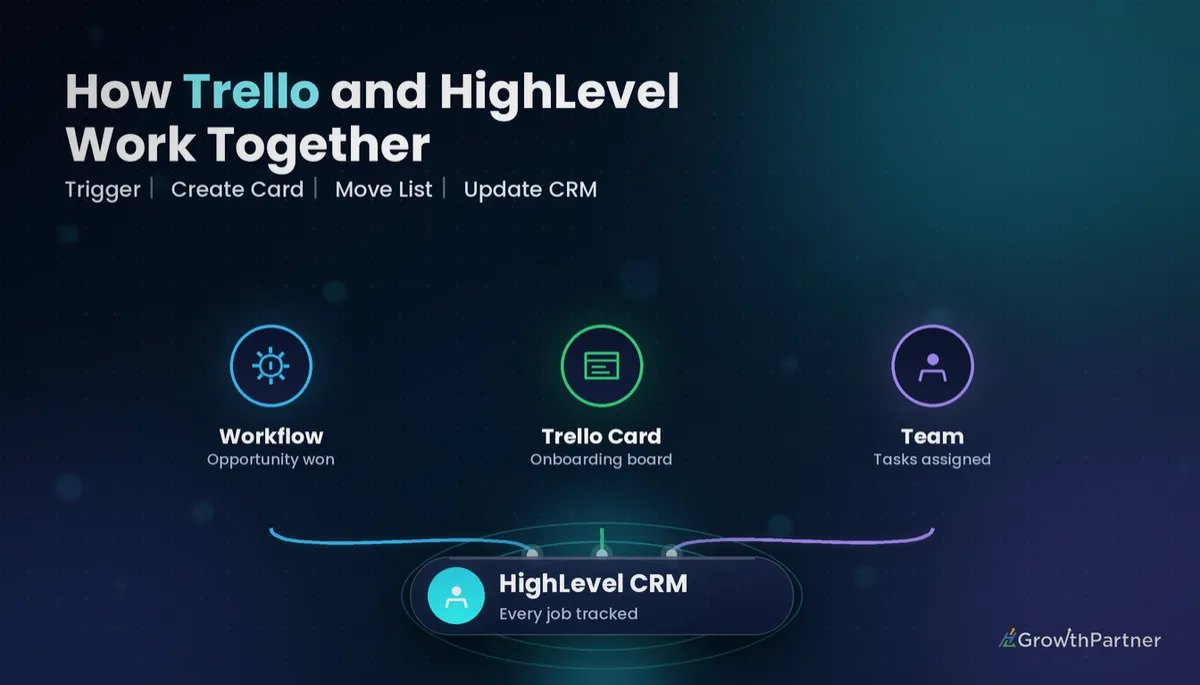
The goal of a HighLevel Trello integration is not to mirror every field in both tools. It is to automate the two moments that matter: the deal is won, and the work is finished.
The two-way loop in plain terms
- Outbound (HighLevel to Trello): a won opportunity creates a card on the onboarding board, pre-filled with contact details and a service checklist.
- Inbound (Trello to HighLevel): moving the card to the Done list tags the contact, writes a note and moves the opportunity to its next stage.
Four ways to connect Trello to GoHighLevel (compared)
HighLevel has no native built-in Trello action to rely on, so you pick one of four routes. If you have read our GoHighLevel Asana integration guide, the shape will feel familiar, because the same options apply.
| Route | How it connects | Skill needed | Best for |
|---|---|---|---|
| Zapier | HighLevel trigger app plus Trello actions such as create card and add checklist | Low | Teams who want point-and-click and already pay for Zapier |
| Make | Make lists both GoHighLevel and Trello modules in one visual scenario | Low to medium | Multi-step builds with routers, such as one checklist per service |
| n8n | HTTP and Trello nodes, cloud or self-hosted | Medium | Technical teams wanting control over hosting and logic |
| Custom Webhook + Inbound Webhook | HighLevel Workflow calls Trello's REST API directly; Inbound Webhook trigger receives updates back | Medium to high | Agencies who want no middleware in the outbound direction |
Zapier: the quickest start
Zapier suits teams that want something running today. Our GoHighLevel Zapier integration walkthrough covers connecting the HighLevel app; from there, a Trello "Create Card" action takes the list, name and description.
Make: best for branching checklists
Make shines when one deal includes several services, because a router can add a different checklist per service. The GoHighLevel Make.com integration guide explains the connection and webhook setup.
Custom Webhook: direct to Trello's API
For the outbound leg you can skip middleware entirely. A HighLevel Custom Webhook action sends a POST request to Trello's /1/cards endpoint with idList, name and desc, authenticated with your Trello API key and token.
The trade-off is error handling. Nothing retries a failed call, so add an internal notification as a fallback.
Automate the handover and the sign-off, not the whole project. Two clean triggers beat a fragile full sync every time.
Setup step 1: create a Trello card when a deal is won
Start in HighLevel with a new Workflow. The cleanest trigger is Opportunity Status Changed, filtered to status Won and to the pipeline that holds your sales deals.
A Pipeline Stage Changed trigger on an "Onboarding" stage also works; use whichever your sales team updates reliably. If you want cards earlier, for pre-sales scoping, the Opportunity Created trigger is an option, but it creates cards for deals that never close.
What to put on the card
- Name: business name plus service, for example the company custom field followed by the package name.
- Description: contact name, email, phone, opportunity value and a link back to the contact record.
- Contact ID: include the HighLevel contact ID in the description or a Trello custom field. You need it for the return trip.
Building the request with a Custom Webhook
Set the method to POST and the URL to Trello's cards endpoint. Add idList (the ID of the "New clients" list on your onboarding board), then map name and desc from contact and opportunity merge fields, and pass your key and token.
Store the key, token and list ID as custom values, so a rotated token means one update instead of a hunt through every sub-account. Trello's REST API documentation lists every card and checklist parameter.
Setup step 2: add a checklist for each service
Two ways to handle checklists
- Template cards: keep one template card per service in Trello and copy it when creating the new card, so the checklist comes with it.
- Checklist calls: create the card first, then add a checklist and its items in follow-up steps. This is easier in Make or n8n, where you can loop through items.
Use an If/Else branch keyed on a "Service" custom field or tag to choose the right template. Keep the checklist content in Trello, not in the Workflow, so your delivery lead can edit steps without touching automations.
Setup step 3: send "Done" back to HighLevel with an Inbound Webhook
The reverse direction turns a one-way push into a real HighLevel Trello integration: when the card lands in Done, HighLevel should know without anyone typing a note.
Catching the card move
Trello webhooks report every change on the watched board, so you need a filter for "moved into Done". A Zapier, Make or n8n trigger watching for a card moved to a specific list is the simplest filter.
That step posts the contact ID, card name and completion date to your HighLevel Inbound Webhook URL.
The HighLevel side
Create a Workflow with the Inbound Webhook trigger, send a test payload, and map the contact ID so HighLevel finds the right record. Then add actions:
- Add tag such as "onboarding-complete", which other Workflows can use to start review requests or upsell sequences.
- Add note recording which card finished and when.
- Update opportunity to move the deal to an "Active client" or "Delivered" stage.
When HighLevel Tasks beat a Trello integration
If onboarding is a short, repeatable checklist owned by one or two people, HighLevel's own Tasks are usually enough, and you avoid a sync that someone has to maintain.
Stay inside HighLevel when
- The same person sells and delivers.
- Onboarding is a handful of steps that a Workflow can assign as Tasks with due dates.
- You want every client interaction, including delivery, visible on the contact record.
Bring in Trello when
- A delivery team already runs on boards and will not move.
- Contractors or specialists work on the project but never log into HighLevel.
- You need a visual, stage-by-stage view across many clients at once.
What a GoHighLevel Trello integration really costs
There are three cost layers: Trello seats, your HighLevel plan, and whatever connects them. Prices are in US dollars, so Australians pay currency conversion.
Trello plans
| Trello plan | Billed annually | Billed monthly | Notes |
|---|---|---|---|
| Free | US$0 | US$0 | Up to 10 collaborators per Workspace |
| Standard | US$5 per user/month | US$6 per user/month | Paid entry tier |
| Premium | US$10 per user/month | US$12.50 per user/month | Adds Calendar, Timeline, Table, Dashboard and Map views |
| Enterprise | From US$17.50 per user/month | Annual billing | For larger organisations |
These figures come from Trello's 2026 pricing page; check the current Trello pricing before you commit, as plans change.
HighLevel plans
| HighLevel plan | Price (2026) | Fits |
|---|---|---|
| Starter | US$97/month | A single business running its own pipeline and onboarding |
| Unlimited | US$297/month | Agencies managing multiple client sub-accounts |
| $497 Founder Plan (formerly Agency Pro) | US$497/month | Agencies reselling HighLevel at scale |
Prices are from HighLevel's 2026 pricing; the Workflows here run on any plan.
The true cost is maintenance, not licences
Middleware platforms charge by usage, and Custom Webhook and Inbound Webhook steps can count as premium actions in HighLevel depending on how your account is billed, so check your own settings. The bigger cost is usually time: rotating tokens, fixing a broken list ID after someone rebuilds a board, and debugging a silent failure.
A small team on Trello Free with a direct Custom Webhook adds very little spend; a larger team on Premium with a multi-branch Make scenario costs more but saves more hours. If you are weighing Trello against other boards, our GoHighLevel ClickUp integration breakdown uses the same cost lens.
Common mistakes to avoid
- Triggering cards on every new opportunity instead of won deals, which floods the onboarding board with leads that never close.
- Leaving the HighLevel contact ID off the card, so the Done update has no way to find the right contact.
- Hard-coding the Trello key, token and list ID in every Workflow instead of storing them as custom values.
- Syncing every field both ways, which creates loops and conflicting edits.
- Building checklist steps inside the Workflow, so the delivery team cannot update them without an admin.
- Skipping a failure alert, so a broken API call quietly stops new client cards appearing.
Or if you just need the software first: grab the 30-day HighLevel trial and book us when you're ready to scale it.
Frequently asked questions
Does GoHighLevel have a native Trello integration?
No. HighLevel has no native built-in Trello action you can rely on, so the connection is made through Zapier, Make, n8n or a Custom Webhook action that calls Trello's REST API directly.
How do I connect Trello to GoHighLevel without Zapier?
Use a HighLevel Workflow with a Custom Webhook action that sends a POST request to Trello's cards endpoint, including the target list ID, card name, description, and your Trello API key and token. For the return trip, use a Trello webhook or a lightweight n8n or Make scenario that posts to a HighLevel Inbound Webhook trigger.
What should trigger a Trello card from HighLevel?
Most agencies trigger the card when a deal is won, using the Opportunity Status Changed trigger filtered to Won or a Pipeline Stage Changed trigger filtered to the onboarding stage. Triggering earlier creates cards for deals that never close.
Can moving a Trello card to Done update the HighLevel contact?
Yes, but only if you build the reverse direction. A middleware tool or Trello webhook watches for the card moving into the Done list and posts the contact ID to a HighLevel Inbound Webhook, and that Workflow then adds a tag, writes a note and moves the opportunity stage.
How much does Trello cost for a small agency?
According to Trello's 2026 pricing page, the Free plan covers up to 10 collaborators per Workspace, Standard is US$5 per user per month billed annually and Premium is US$10 per user per month billed annually.
Which HighLevel plan do I need for a Trello integration?
Any HighLevel plan can run the Workflows involved, including Starter at US$97 per month according to HighLevel's 2026 pricing. Agencies rolling it into many client sub-accounts usually choose Unlimited or the $497 Founder Plan.
Should I use HighLevel Tasks instead of Trello?
If your delivery is a short, repeatable checklist handled by one or two people, HighLevel Tasks keeps everything inside one system and avoids a sync to maintain. Trello earns its place when the team already lives on boards or includes people who never log into HighLevel.
Related Articles on HL Growth Partner
More project tool integrations
 GoHighLevel Notion Integration: Setup & Cost (2026)
 GoHighLevel Airtable Integration: Setup & Cost (2026)
 GoHighLevel Slack Integration: Setup & Cost (2026)