GoHighLevel Smartsheet Integration: Setup & Cost (2026)
 By Dr Priya Jaganathan, GoHighLevel Certified Admin · HL Growth Partner, Australia · Updated 8 November 2026 · 9 min read
How to connect HighLevel to Smartsheet in 2026, which of the three connection methods suits your agency, and what the whole stack really costs each month.
Some links below are affiliate links — if you sign up through them, HL Growth Partner may earn a commission at no extra cost to you. It never changes what we recommend.
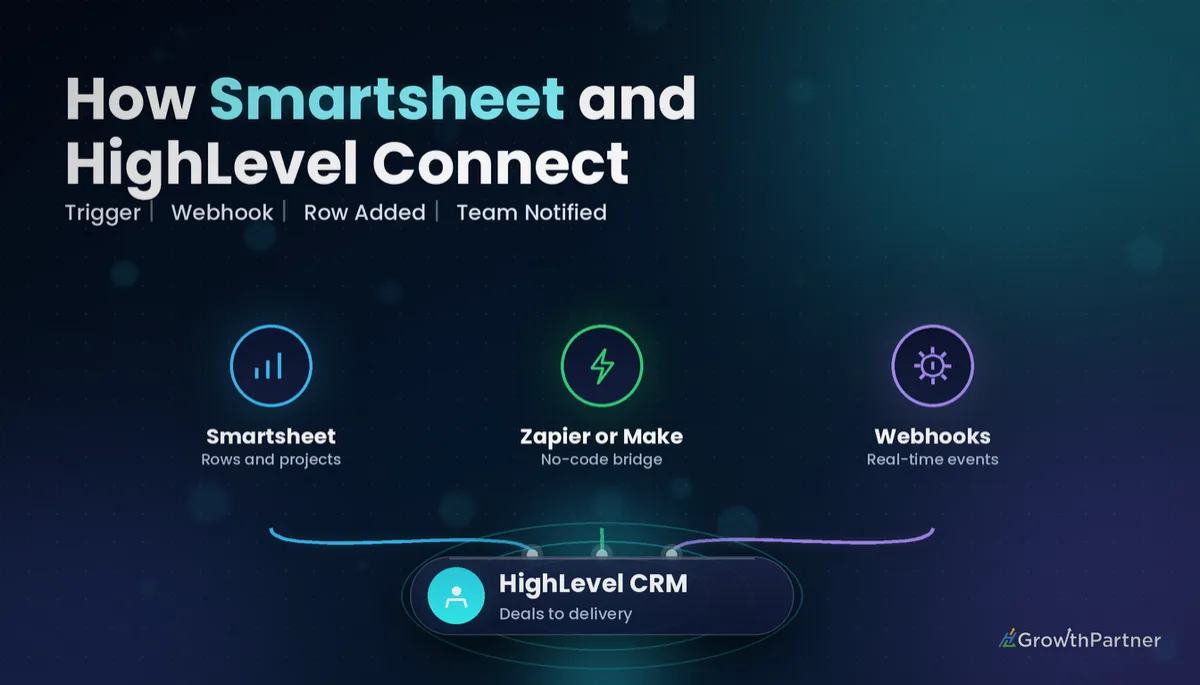
A GoHighLevel Smartsheet integration lets your sales side and your delivery side stop retyping each other's data. When a deal is won in HighLevel, the project sheet gets its row; when the delivery team marks a milestone done in Smartsheet, the client hears about it from HighLevel.
There is no native connector yet, so this guide walks through the three ways agencies actually wire it up, a step-by-step Zapier recipe, the webhook method for teams who want to avoid per-task fees, and real monthly cost scenarios built only from published list prices.
| Native HighLevel-Smartsheet app | None in the HighLevel App Marketplace (check in case that changes) |
| Connection options | Zapier, Make, or HighLevel Custom Webhook / Inbound Webhook plus the Smartsheet API |
| Smartsheet Pro | US$9 per member/month billed annually, or US$12 billed monthly (1-10 members) |
| Smartsheet Business | US$19 per member/month billed annually, or US$24 monthly (minimum 3 members) |
| Smartsheet Enterprise | Quote-based |
| HighLevel plans | Starter US$97, Unlimited US$297, Founder Plan US$497 per month |
Why agencies connect HighLevel to Smartsheet
Smartsheet suits teams that plan in rows, Gantt charts and resource views; HighLevel holds the leads, pipelines and conversations. The gap is usually a project manager copying details across by hand.
The integration is worth building the moment a won deal triggers manual setup work.
Won deal to project row or onboarding sheet
The most common recipe: an opportunity moves to "Won" in your sales pipeline and a new row appears in your master projects sheet with the client name, package, value, start date and account manager. Some agencies instead copy a template onboarding sheet per client.
Form submission to intake row
An onboarding form or survey in HighLevel captures brand assets, access details and goals. Each submission lands as a Smartsheet intake row the delivery team can assign.
Smartsheet status change back to HighLevel
When a row's status changes to something like "Website live" or "Campaign launched", HighLevel can update the opportunity stage, add a tag, and fire a Workflow that sends the client an SMS or LC Email update.
Three ways to set up a GoHighLevel Smartsheet integration
With no native app, you are choosing between two automation platforms and a direct API build. Volume and in-house skill decide it.
| Method | Best for | Cost driver | Effort |
|---|---|---|---|
| Zapier | Agencies wanting the fastest, no-code setup for one-way flows | Free tier with task limits; paid tiers scale by task volume | Low: an hour or two per Zap |
| Make | Multi-step scenarios, routers, and two-way sync with filters | Free tier with operation limits; paid tiers scale by operations | Medium: visual builder, more logic to test |
| Custom Webhook + Smartsheet API | High volume, or teams avoiding third-party task fees | Your HighLevel plan plus any Workflow premium action billing | Higher: API tokens, column IDs and JSON payloads |
If you have already connected another tool such as Airtable, the patterns are almost identical; our HighLevel Airtable integration guide covers the same three routes with a database-style tool.
Which method to pick
Choose Zapier for simple one-way flows owned by a non-technical team member. Choose Make when scenarios branch, and webhooks when steady volume makes per-task fees hurt.
Step-by-step: connect HighLevel to Smartsheet with Zapier
This recipe creates a Smartsheet row whenever an opportunity is won.
1. Prepare the Smartsheet sheet
Create a projects sheet with columns for client name, email, phone, package, deal value, start date, owner, status and, critically, a HighLevel Opportunity ID column.
2. Choose the HighLevel trigger
- In Zapier, create a Zap and pick the HighLevel (LeadConnector) app.
- Choose the Opportunity Status Changed trigger for won/lost logic, or Pipeline Stage Changed if you hand over at a specific stage.
- Connect your sub-account and load a test opportunity.
3. Add a filter
Add a Zapier filter so the Zap only continues when status equals "won" or the stage equals your handover stage.
4. Add the Smartsheet "Add Row" action
- Pick Smartsheet, choose Add Row, and connect a Smartsheet account with access only to the relevant sheet.
- Select the sheet, then map each column to the HighLevel fields (see the mapping table below).
- Map the opportunity ID into your HighLevel Opportunity ID column.
- Test the step, check the row in Smartsheet, then publish.
5. Close the loop inside HighLevel
Back in HighLevel, add a tag such as "project-created" through a Workflow on the same trigger, so your team can see at a glance which clients have been handed to delivery. If you are unsure which trigger fits, our complete guide to HighLevel Workflow triggers explains each one.
The webhook method: HighLevel Custom Webhook to the Smartsheet API
For agencies that want to avoid a middle platform, HighLevel Workflows can talk to Smartsheet directly. The trade-off is setup effort, not ongoing cost.
Outbound: HighLevel to Smartsheet
- Generate a Smartsheet API access token from a dedicated integration user with access to only the sheets it needs.
- Note the sheet ID and the column IDs, because the add rows endpoint expects cells by column ID.
- In a HighLevel Workflow, after your trigger and filters, add the Custom Webhook action with method POST to
https://api.smartsheet.com/2.0/sheets/{sheetId}/rows. - Set an Authorization header of
Bearerplus the token, a JSON content type, and a body containing the cells, using custom values and contact or opportunity merge fields. - Test with a dummy contact and check the execution log.
Store the token somewhere secure and never paste it into snapshots, shared docs or Slack. If it is ever exposed, revoke it and issue a new one.
Inbound: Smartsheet back to HighLevel
For status changes, Smartsheet webhooks (or a Make/Zapier watcher) can post to a HighLevel Inbound Webhook trigger. The Workflow then updates the opportunity, adds a tag and messages the client.
Both the Custom Webhook action and the Inbound Webhook trigger can count as premium Workflow usage, so check your Workflow premium action billing before switching on high-volume flows. For token scopes and private integrations on the HighLevel side, read our HighLevel API and private integrations guide.
The integration is only as reliable as its unique ID column. Put the HighLevel opportunity ID in every Smartsheet row and most sync problems simply disappear.
Two-way Smartsheet sync: loops, duplicates and unique IDs
Two-way sync is where most HighLevel to Smartsheet builds go wrong: without guard rails you get endless loops or a sheet full of duplicates.
- Loops: if a Smartsheet change updates HighLevel, and that HighLevel change triggers a new Smartsheet update, the two systems ping-pong. Use filters so each side only reacts to the specific field the other side does not write.
- Duplicates: retries and re-triggered Workflows create extra rows. Search for the opportunity ID before adding, and update the existing row if it is found.
- Unique ID: use the HighLevel contact or opportunity ID as the key.
- Ownership: decide which system owns each field. HighLevel owns contact details and deal value; Smartsheet owns delivery status and dates.
The same rules apply to every project tool; our Monday.com and HighLevel setup walkthrough shows how the ownership split works on a board-based tool.
Field mapping for a HighLevel Smartsheet integration
Map only what delivery genuinely needs; every extra field is another thing to break.
| HighLevel field | Smartsheet column | Column type | Notes |
|---|---|---|---|
| Opportunity ID | HighLevel Opportunity ID | Text/Number | Unique key; never edit by hand |
| Contact full name | Client name | Text/Number (primary) | Use company name for B2B |
| Email / phone | Client email / phone | Contact or Text | Only if delivery contacts the client directly |
| Opportunity name or custom field "Package" | Package | Dropdown | Keep dropdown values identical in both tools |
| Opportunity value | Deal value | Text/Number | Consider hiding from contractors |
| Custom field "Start date" | Start date | Date | Format dates consistently |
| Assigned user | Owner | Contact | Match user emails across tools |
| Pipeline stage (inbound) | Status | Dropdown | Smartsheet owns this field |
GoHighLevel Smartsheet integration cost: monthly scenarios
These scenarios use published list prices and exclude Zapier or Make, which have free tiers with task or operation limits and paid tiers that scale by volume. Confirm current figures on the official Smartsheet pricing page before you budget.
| Scenario | Smartsheet | HighLevel | Total per month (before automation tool) |
|---|---|---|---|
| Solo operator, Pro billed monthly | 1 member x US$12 = US$12 | Starter US$97 | US$109 |
| Small team, Pro billed annually | 3 members x US$9 = US$27 | Starter US$97 | US$124 |
| Agency, Business billed annually | 3 members x US$19 = US$57 | Unlimited US$297 | US$354 |
| Agency, Business billed monthly | 3 members x US$24 = US$72 | Unlimited US$297 | US$369 |
| API-heavy agency, Business billed annually | 3 members x US$19 = US$57 | Founder Plan US$497 | US$554 |
A 3-member Business plan billed annually is US$57 a month, plus your HighLevel plan. The Founder Plan, renamed from Agency Pro at LevelUp on 27 October 2026, includes advanced API access, which matters if you plan to build deeper private integrations alongside the webhook route.
Not on HighLevel yet? Start with a free 30-day trial here — long enough to build everything in this guide before you pay a cent.
If you are weighing whether Smartsheet should stay in the stack at all, our analysis of when agencies should consolidate tools into HighLevel is a useful sanity check.
Security and data notes for Australian businesses
This integration moves personal information between systems. If the Privacy Act applies to your business, treat it as part of how you handle personal information, not just an admin tool.
- Least privilege: create a dedicated integration user and token with access only to the sheets the automation needs.
- Minimise data: do not push sensitive notes, health details or payment information into project sheets.
- Disclose: make sure your privacy policy reflects the tools you share client data with.
- Rotate and revoke: rotate tokens when staff or contractors leave, and remove sheet sharing at the same time.
Common mistakes to avoid
- Building the Zap without a status filter, so lost deals create rows too.
- Skipping a unique ID column, which makes updates and de-duplication almost impossible.
- Renaming Smartsheet columns after go-live without updating the mapping.
- Pasting the Smartsheet API token into a snapshot or shared doc.
- Letting both systems edit the same field, which creates sync loops.
- Forgetting to check Workflow premium action billing before switching on high-volume webhooks.
Or if you just need the software first: grab the 30-day HighLevel trial and book us when you're ready to scale it.
Frequently asked questions
Does GoHighLevel have a native Smartsheet integration?
No. There is no native HighLevel-Smartsheet integration in the HighLevel App Marketplace, so agencies connect the two through Zapier, Make, or HighLevel's Custom Webhook and Inbound Webhook workflow actions plus the Smartsheet API. Check the Marketplace periodically in case that changes.
How do I connect HighLevel to Smartsheet with Zapier?
Create a Zap with the HighLevel trigger Opportunity Status Changed or Pipeline Stage Changed, add a filter for your won status or handover stage, then add the Smartsheet Add Row action and map each column. Map the opportunity ID to its own column.
How much does Smartsheet cost alongside HighLevel?
A 3-member Smartsheet Business plan billed annually is US$57 a month (US$19 per member), added to your HighLevel plan of US$97, US$297 or US$497. Smartsheet Pro starts at US$9 per member billed annually; confirm current prices on Smartsheet's pricing page.
Can I sync Smartsheet status changes back into HighLevel?
Yes. Send Smartsheet row changes to a HighLevel Inbound Webhook trigger, then use the Workflow to update the opportunity stage, add a tag and notify the client by SMS or email.
How do I stop duplicate rows and sync loops?
Use the HighLevel contact or opportunity ID as a unique key column in Smartsheet, search for it before adding a row, and update the existing row when found. Give each field one owning system.
Is it safe to store client data in Smartsheet under Australian privacy law?
It can be, if you handle it deliberately. Use least-privilege tokens, push only the data delivery needs, and make sure your privacy policy reflects the tools you share client data with.
Related Articles on HL Growth Partner
More project management integrations
 GoHighLevel Asana Integration: Setup & Cost (2026)
 GoHighLevel ClickUp Integration: Setup & Cost (2026)
 GoHighLevel Wrike Integration: Setup & Cost (2026)
Boards, docs and dev tools
 GoHighLevel Trello Integration: Setup & Cost (2026)
 GoHighLevel Notion Integration: Setup & Cost (2026)