GoHighLevel Jira Integration: Setup & Cost (2026)
 By Dr Priya Jaganathan, GoHighLevel Certified Admin · HL Growth Partner, Australia · Updated 7 November 2026 · 9 min read
How to connect GoHighLevel to Jira Cloud in 2026, which of the four connection methods suits your team, and what the whole stack really costs each month.
Some links below are affiliate links — if you sign up through them, HL Growth Partner may earn a commission at no extra cost to you. It never changes what we recommend.
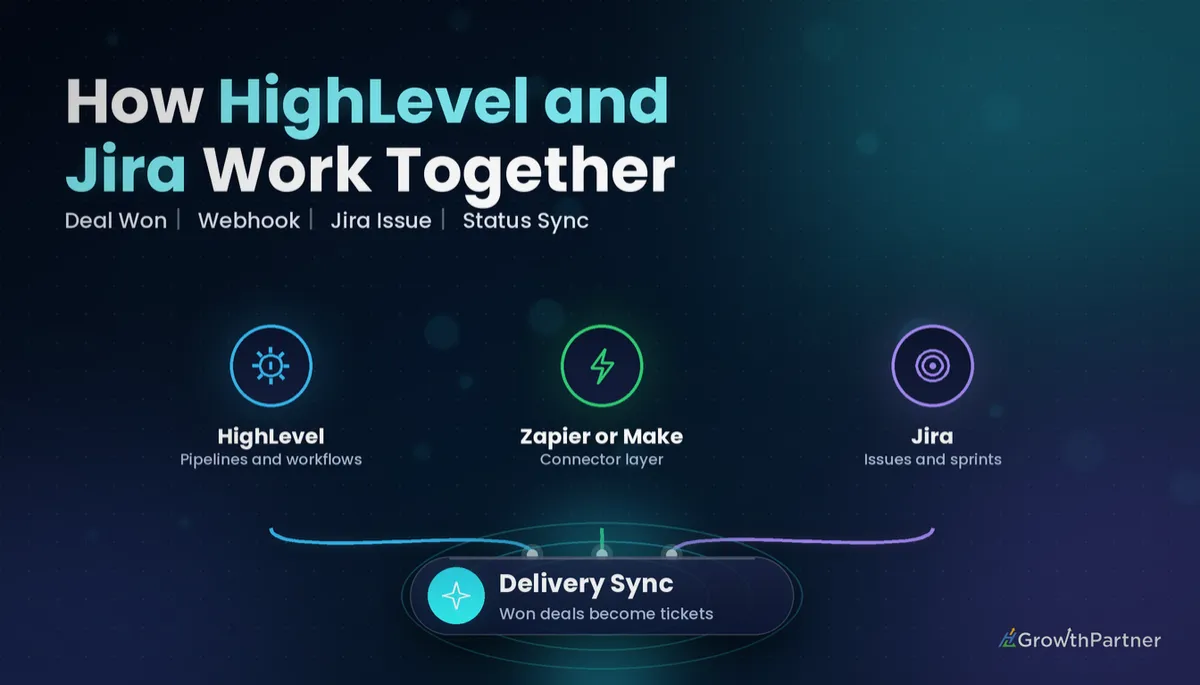
A GoHighLevel Jira integration lets your sales side and your delivery side stop retyping each other's work. When a deal is won in HighLevel, a Jira issue or epic appears for the developers, and when the team moves that work forward, the client record in HighLevel knows about it.
This is the next guide in our project-management series, and Jira is the odd one out. Most agencies use it because they build software, websites or custom integrations for clients, so the hand-off from CRM to engineering has to be exact. Here is how we set it up for clients and what it costs at the time of writing (November 2026).
| Native HighLevel Jira steps | Yes, in Workflows: 2 triggers and 11 actions (HighLevel changelog, 2026) |
| Jira Free plan | Up to 10 users, 2 GB storage (Atlassian, 2026) |
| Jira Standard / Premium | About US$9.70 / US$19.60 per user per month, 1–100 users, from 13 October 2026 (Atlassian list pricing tables, 2026) |
| Jira Automation incoming webhook | Available in Jira Cloud as a trigger (Atlassian Support, 2025) |
| HighLevel plans | $97 Starter, $297 Unlimited, $497 Founder Plan per month (HighLevel, 2026) |
| HighLevel premium actions | US$0.01 per execution (HighLevel changelog, 2026) |
Is there a native GoHighLevel Jira integration in 2026?
Yes, and this is the big change from a year ago. HighLevel's changelog and its support article "Jira Integration: Actions and Triggers in HighLevel" (2026) describe Jira as a native Workflows integration with two triggers and eleven actions, connected through OAuth.
The triggers fire when a Jira issue is created or updated. The actions cover finding users, projects and issues, creating and updating issues, adding comments, watchers, attachments and work logs, linking issues and moving an issue to a sprint.
Each step also has a Cloud Site selector, so one Atlassian login can target the right Jira site. Cloud Site is required on Create issue and works as a filter on the triggers, according to HighLevel's help documentation (2026).
There are limits. The published action list has no dedicated status-transition step, and nothing we found confirms that native Jira steps are free of premium billing, so test in a sandbox sub-account before you build a client's whole delivery flow on it. We did not find a GoHighLevel app on the Atlassian Marketplace; the connection lives on the HighLevel side.
Four ways to connect GHL to Jira
Pick the method by how much control you need and who will maintain it after go-live.
| Method | Best for | Trade-off |
|---|---|---|
| Native Jira actions in Workflows | Creating and updating issues from CRM events | No dedicated transition step in the published list |
| Zapier | Non-technical teams, fast setup | Task-based pricing climbs with volume |
| Make | Multi-step logic, routers, data mapping | Steeper learning curve |
| Webhooks plus Jira Cloud REST API or Jira Automation | Dev shops wanting full control | You own the error handling |
1. Native Jira actions
Start here. Add a Jira action inside any Workflow, click Connect your account, approve the OAuth pop-up and choose your Cloud Site. For most "deal won, create issue" builds, this removes the need for a third-party tool.
2. Zapier
Zapier has long-standing HighLevel and Jira Software Cloud apps, and it is still the quickest route for status sync if you prefer not to touch an API. Our GoHighLevel Zapier integration guide covers authentication and task budgeting.
3. Make
Make suits builds with branching, such as different Jira projects for web, app and SEO work. If you already run scenarios there, our walkthrough on connecting HighLevel with Make shows the module setup.
4. Webhooks, the REST API and Jira Automation
The developer route uses HighLevel's Webhook or Custom Webhook action to post JSON to Jira. You can call the Jira Cloud REST API directly with an Atlassian API token, or post to a Jira Automation rule that starts with the Incoming webhook trigger.
Atlassian's support article on incoming webhooks (2025) confirms the trigger works in Jira Cloud. Your payload is read through the webhookData smart value, and you create the rule under Integrations in the trigger list. Read the Atlassian guide to incoming webhooks and smart values before you map fields.
For the HighLevel side of this pattern, see setting up inbound and outbound webhooks in GoHighLevel.
HighLevel Jira integration setup, step by step
This is the build we use most for agencies: a won deal creates a Jira epic, the issue key comes back to HighLevel, and Jira status changes flow back to the opportunity.
Step 1: Prepare both sides
- In HighLevel, create custom fields for Jira Issue Key, Jira Issue URL and Jira Status.
- In Jira, decide the project, issue type (Epic or Task) and the fields you will populate.
- Add a reporter or service account in Jira so issues are not tied to one staff member's login.
Step 2: Trigger the Workflow
Use the Opportunity Status Changed trigger filtered to Won, or Pipeline Stage Changed for a specific "Onboarding" stage. Form Submitted works well for intake forms on a client portal.
Step 3: Create the Jira issue
Add the native Jira Create issue action, select the Cloud Site and project, and map the summary to the opportunity name plus the company. Put scope notes, the contact's email and the deal value in the description so developers never have to open the CRM.
Step 4: Write the issue key back
Map the returned issue key into your Jira Issue Key custom field. This single field is what makes two-way sync possible, because every later update is matched on it.
If you went the API route instead, an Update Contact or Update Opportunity step can store the key from the webhook response, or Jira can post it back to a HighLevel Inbound Webhook trigger. For direct API calls, use a Private Integration token scoped to contacts and opportunities; our guide to HighLevel Private Integration tokens explains scopes.
Step 5: Push Jira status back to HighLevel
Use the native Jira Updated issue trigger in a second Workflow, filtered to your project, then update the Jira Status field and move the opportunity stage. Alternatively, build a Jira Automation rule on "Work item transitioned" that sends a web request to a HighLevel Inbound Webhook trigger.
Once the status lands in HighLevel, you can send the client a "your build is in QA" SMS or notify the account manager internally.
The integration is not the hard part. Agreeing on which system owns which field is, and you need to write that down before you build anything.
GoHighLevel Jira integration cost in 2026
All prices below are in US dollars, at the time of writing (November 2026). Check each official page before you budget, because Atlassian changed both pricing and automation allowances in the second half of 2026.
| Item | Price | Source |
|---|---|---|
| Jira Free | $0, up to 10 users | Atlassian, 2026 |
| Jira Standard | About $9.70 per user per month (1–100 users) | Atlassian list pricing tables, effective 13 October 2026 |
| Jira Premium | About $19.60 per user per month (1–100 users) | Atlassian list pricing tables, effective 13 October 2026 |
| Zapier Professional | From $19.99 per month billed yearly ($29.99 monthly), 750 tasks | Zapier pricing as reported by Jetadmin, 2026 |
| Make Core | About $10.59 per month billed yearly, 10,000 credits | Make pricing as reported by CostBench, 2026 |
| HighLevel Starter / Unlimited | $97 / $297 per month | HighLevel, 2026 |
| HighLevel Founder Plan | $497 per month (formerly Agency Pro) | HighLevel help centre, 2026 |
| HighLevel premium actions | $0.01 per execution | HighLevel changelog, 2026 |
Watch Jira's automation allowance too. Pricing trackers such as PricingSaaS (September 2026) report that Atlassian now counts "automation steps" rather than rule runs, at 150 per month on Free, 400 per user on Standard and 750 per user on Premium.
A typical small agency on HighLevel Unlimited with five Jira Standard users and native Jira steps spends about $345 a month all-in. Adding Zapier or Make is only worth it when the native steps cannot do the job, usually for status transitions or complex routing.
Not on HighLevel yet? Start with a free 30-day trial here — long enough to build everything in this guide before you pay a cent.
See the official Atlassian Jira pricing page for current pricing.
When HighLevel project management is enough instead of Jira
HighLevel has its own tasks, pipelines and growing project management tools. For marketing agencies running campaigns, onboarding and monthly reporting, those are often enough, and you avoid paying for a second system.
Jira earns its seat when you have:
- Developers working in sprints, backlogs and story points.
- Bug tracking with environments, versions and releases.
- Links to Git repositories and deployment pipelines.
- More than one team picking up the same client work.
If none of those apply, keep delivery inside HighLevel and save the subscription.
Agency and dev-shop use cases for a GoHighLevel Jira integration
- Web build hand-off: a won opportunity creates an epic with child tasks for design, build and QA.
- Support tickets: a client portal form creates a Jira bug with the contact's details attached.
- Change requests: a quote accepted in HighLevel creates a scoped task and logs estimated hours.
- Client updates: Jira status changes trigger SMS or email updates from HighLevel.
- Retainer reporting: work logs in Jira feed a monthly summary note on the contact.
Common mistakes to avoid
- Not storing the Jira issue key in a HighLevel custom field, so later updates create duplicates.
- Connecting Jira with a staff member's personal account, then losing access when they leave.
- Triggering on every pipeline stage change instead of filtering to the one stage that matters.
- Ignoring Jira's monthly automation allowance and having rules stop mid-month.
- Letting both systems edit the same field, which causes status ping-pong.
- Paying for Zapier or Make before testing whether the native Jira actions cover the build.
Or if you just need the software first: grab the 30-day HighLevel trial and book us when you're ready to scale it.
Frequently asked questions
Does GoHighLevel integrate natively with Jira?
Yes. HighLevel added Jira as a native Workflows integration with two triggers for new and updated issues and eleven actions, including create issue, update issue, comment and move to sprint. It connects to Jira Cloud through OAuth.
Can HighLevel create a Jira issue when a deal is won?
Yes. Build a Workflow with the Opportunity Status Changed trigger filtered to Won, then add the Jira Create issue action. Store the returned issue key in a HighLevel custom field so later updates match the right issue.
How much does a GoHighLevel Jira integration cost?
Jira Free costs nothing for up to 10 users, while Standard is about US$9.70 per user per month for small teams from October 2026. HighLevel starts at $97 per month. Zapier or Make add roughly US$11 to US$30 per month at entry level if you need them.
Can Jira status changes update HighLevel automatically?
Yes. Use the native Jira Updated issue trigger in a HighLevel Workflow, or a Jira Automation rule that sends a web request to a HighLevel Inbound Webhook trigger. Then update a status custom field or move the opportunity stage.
Does Jira Automation support incoming webhooks?
Yes. Jira Cloud Automation includes an Incoming webhook trigger listed under Integrations. The posted JSON is available in the rule through the webhookData smart value.
Do I need Zapier to connect GHL to Jira?
Not for most builds. The native Jira actions in HighLevel Workflows handle creating and updating issues. Zapier or Make are useful when you need status transitions, complex routing or apps beyond HighLevel and Jira.
Is HighLevel project management enough instead of Jira?
For marketing agencies running campaigns and onboarding, HighLevel tasks and pipelines are often enough. Jira is worth it when developers work in sprints, track bugs across releases or connect work to code repositories.
Related Articles on HL Growth Partner
Other project management integrations
 GoHighLevel ClickUp Integration: Setup & Cost
 GoHighLevel Asana Integration: Setup & Cost
 GoHighLevel Monday.com Integration: Setup & Cost