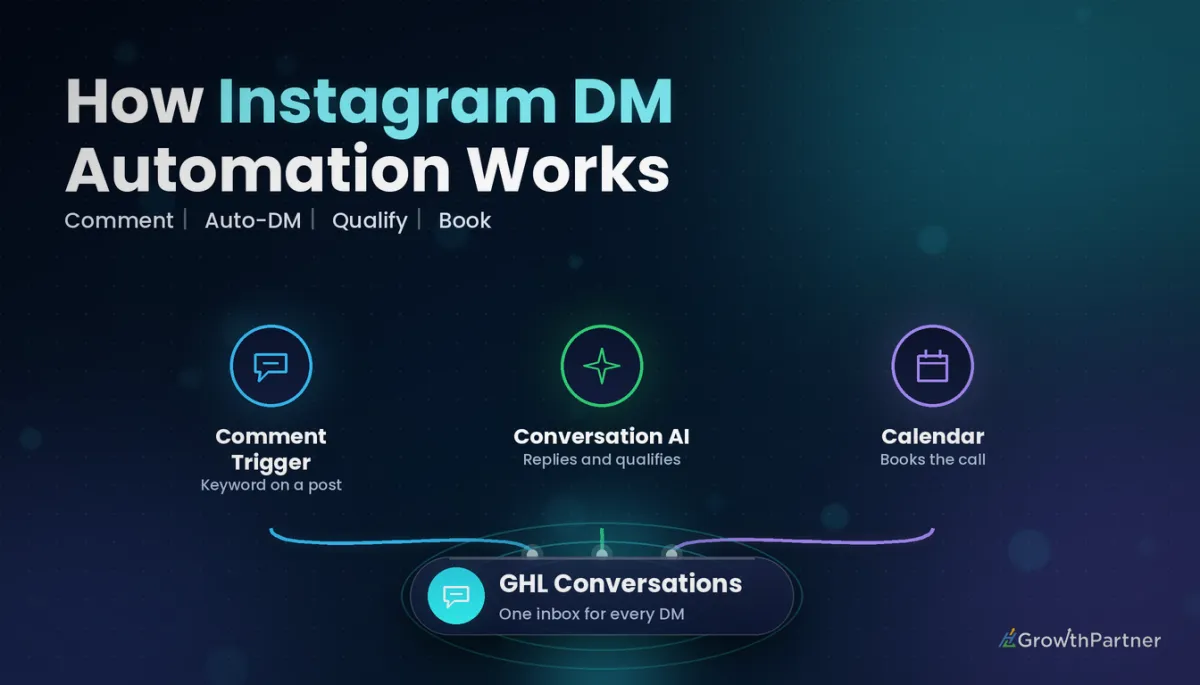
GoHighLevel Instagram DM Automation: Setup (2026)
By Dr Priya Jaganathan, GoHighLevel Certified Admin · HL Growth Partner, Australia · Updated 2 October 2026 · 10 min read
Some links below are affiliate links — if you sign up through them, HL Growth Partner may earn a commission at no extra cost to you. It never changes what we recommend.
GoHighLevel Instagram DM automation lets you turn comments and direct messages into tagged contacts, qualified leads and booked calls, without someone sitting on the phone answering "info?" forty times a day. Done well, it feels like fast, personal service. Done badly, it feels like a spam bot, and Instagram notices.
This guide walks through the full setup as we build it for clients in 2026: connecting the account so DMs land in Conversations, the exact workflow triggers to use, comment-to-DM keyword automation, Conversation AI for qualifying and booking, human handoff, tagging and pipelines, and the Meta messaging rules that sit underneath all of it.
Quick Facts
| Account type | Instagram professional account (Business or Creator) |
| Where to connect | Settings > Integrations in the sub-account |
| Comment trigger | Instagram Comment(s) On A Post (under Facebook/Instagram Events) |
| DM trigger | Customer Replied, with the Reply Channel filter set to Instagram DM |
| DM actions | Instagram DM, Instagram Interactive Messenger, Reply In Comments |
| Conversation AI | Instagram is a supported channel for Auto-Pilot bots |
Step 1: Connect Instagram so HighLevel Instagram automation can see your DMs
Nothing works until Instagram is properly connected, and Meta only grants messaging access to professional accounts.
Check these prerequisites first:
- The Instagram account is switched to a professional account (Business or Creator), not a personal profile.
- The Instagram account is linked to the correct Facebook Page in Meta's settings.
- The person connecting has admin access to that Facebook Page and the Instagram account.
- "Allow access to messages" is enabled in the Instagram app's message settings, so connected tools can read DMs.
Then, inside the sub-account, go to Settings > Integrations and connect Facebook and Instagram. Pick the Page that the Instagram account is linked to, grant every permission Meta asks for, and confirm the Instagram account shows as connected.
HighLevel has also introduced a dedicated Instagram card in Integrations, with a Messaging & Automations toggle per connected account. If you see it, make sure that toggle is on. If you already run lead forms through the same Page, our walkthrough of the Facebook and Instagram lead ads integration covers the shared Page connection in more detail.
To test, DM the account from a separate personal profile and check it lands in Conversations.
Step 2: Pick the right GoHighLevel Instagram DM automation triggers
Two triggers do the heavy lifting: one for public comments, one for private messages. Mixing them up is why many Instagram workflows "do nothing".
| Trigger | What it fires on | Best use |
|---|---|---|
| Instagram Comment(s) On A Post | A comment on your Instagram post, filtered by post and phrase | Comment-to-DM keyword campaigns ("comment GUIDE") |
| Customer Replied (Reply Channel: Instagram DM) | An inbound Instagram direct message from a contact | Auto-replies, qualification, tagging and routing DMs |
| Facebook Comment(s) On A Post | Comments on your Facebook Page posts | Mirror the same campaign on Facebook (separate workflow) |
The comment trigger lives under Facebook/Instagram Events in the trigger list. It only works for Instagram, so a cross-posted campaign needs its own Facebook workflow. For the full catalogue of what else can start a workflow, see our complete reference to GoHighLevel workflow triggers.
Comment trigger filters that matter
According to HighLevel's help article on the Instagram Comment(s) On A Post trigger, you narrow it down with a few filters:
- Page Is, then Post Type (Published Post, or Custom Post where you paste a URL), then Post Is to choose the specific post.
- Contains Phrase (the keyword appears anywhere in the comment) or Exact Match (the comment must be identical).
- A toggle to fire only on first-level comments, so replies nested under other comments are ignored.
For keyword campaigns we use Contains Phrase, because people type "guide pls" or "GUIDE!!".
Customer Replied for inbound DMs
For direct messages, use the Customer Replied trigger and add the Reply Channel filter set to Instagram DM. Without that filter, the workflow will also fire on SMS, email and every other channel, which is how people accidentally send Instagram-style replies to SMS leads.
You can stack further filters on the same trigger, such as Contains Phrase, Has Tag / Doesn't Have Tag, or Intent Type. HighLevel's article on the Customer Replied trigger lists every option.
Step 3: Build comment-to-DM keyword automation
This is the classic "comment GUIDE and I'll send it" play: a keyword comment earns a short public reply and a private DM.
The fastest start is HighLevel's Instagram Comment Automation workflow recipe, which gives you a working skeleton. Then shape it like this:
- Trigger: Instagram Comment(s) On A Post, filtered to one post, Contains Phrase "guide", first-level comments only.
- Action 1, Reply In Comments: a short, human public reply ("Sent it to your DMs, Sarah!"). Write two or three variations rather than one repeated line.
- Action 2, Instagram Interactive Messenger: choose the "Reply to Comment via DM" reply type and send the opening message.
- Action 3, Add Tag: something like
ig-guide-requestedso you can report on the campaign.
The Instagram Interactive Messenger action only appears when the workflow uses an Instagram-specific trigger. It supports buttons for durable actions ("Book a call", "Get the guide") and quick replies for short questions. HighLevel's documentation states you can add up to 13 quick replies, each up to 20 characters, and that quick replies cannot be combined with an attachment in the same message.
Each button or quick reply creates its own workflow branch. That is where the real value sits: someone who taps "Pricing" can be tagged, moved to a pipeline stage and handed to Conversation AI, while someone who taps "Just the guide" simply receives the link.
Why that first message has to earn a reply
Meta's developer documentation on Private Replies says a private reply to a comment can only be a single message, and it must be sent within seven days of the comment. In practice, the conversation only properly opens once the person replies.
So ask one quick-reply question ("Want the guide, or a quick chat?") and let their tap open the standard messaging window.
Not on HighLevel yet? Start with a free 30-day trial here — long enough to build everything in this guide before you pay a cent.
Step 4: Use Conversation AI on Instagram to qualify and book
HighLevel's help documentation confirms Instagram as a supported channel for Auto-Pilot bots, configured in the bot's settings alongside SMS and Facebook. A practical Instagram setup looks like this:
- Create a bot dedicated to Instagram, or make sure Instagram is ticked as a channel on your existing bot.
- Train it on your offers and FAQs in a casual Instagram tone.
- Give it a short qualification script: two or three questions, not ten.
- Connect your calendar so it can offer times and book directly in the DM.
If you have not trained a bot before, start with our Conversation AI setup and training guide. You can also start the bot from a workflow branch using the Conversation AI workflow action, so only people who tapped "Pricing" or "Book a call" get the AI.
Human handoff without losing the lead
Every Instagram bot needs an exit. Complaints, complex quotes and anyone asking for "a real person" should reach a human quickly.
Set clear handoff rules in the bot, assign the conversation to a team member, and send them an internal notification. Our guide to Conversation AI human handoff rules shows the exact stop conditions we use. Speed matters here, because of the messaging window covered below.
Step 5: Tag every Instagram lead and push it into a pipeline
Instagram leads are invisible in reporting unless you label them. We use a consistent pattern:
src-instagramon every contact created from a comment or DM.- A campaign tag per keyword, such as
ig-guide-requestedorig-webinar-oct. - An intent tag from the quick-reply branch, such as
intent-pricing.
Then add a Create/Update Opportunity action on high-intent branches. If your tags are already messy, our GoHighLevel tag naming strategy will help you tidy them before you add more.
Meta's Instagram messaging rules you must design around
Your HighLevel Instagram automation runs on Meta's messaging API, so Meta sets the limits. Check the current Messenger Platform and Instagram Messaging API policy on Meta for Developers, as these rules change.
| Rule | What it means | How to design for it |
|---|---|---|
| Standard messaging window | Meta's documentation says businesses have 24 hours to respond to a message an Instagram user sends | Reply and run automations promptly; avoid long Wait steps between DMs |
| Human Agent tag | Allows a human representative to reply manually for longer (Meta documents up to 7 days) for unresolved enquiries | Use only for real human replies; never for bots or promotions |
| Private reply to a comment | One message per comment, within seven days of the comment | Make that first DM count and invite a reply |
The practical takeaway: treat 24 hours as a hard limit for anything automated. A "day 3 follow-up" DM that works fine on SMS will usually fail on Instagram unless the person has messaged you again.
For longer nurture, capture an email address or mobile number inside the DM, then continue the sequence on those channels. A fast speed-to-lead routine is a good model for making sure the human follow-up happens inside the window.
Common mistakes to avoid
- Leaving out the Reply Channel filter on Customer Replied, so Instagram workflows fire on SMS and email replies.
- Using Exact Match for comment keywords and missing most real comments with emojis, capitals or extra words.
- Posting the same spammy public reply on every comment, or running keyword triggers on every post at once. Rotate wording and run one or two campaigns at a time.
- Stacking automated DMs. One opener, one follow-up after they reply, then a human or Conversation AI.
- Adding multi-day Wait steps between Instagram DMs and expecting them to send outside the messaging window.
- Running Conversation AI on Instagram with no handoff rules, so complaints get cheerful bot replies.
If you want a done-with-you Instagram comment-to-DM and Conversation AI build that books calls without feeling spammy, book a strategy call with the HL Growth Partner team.
Or if you just need the software first: grab the 30-day HighLevel trial and book us when you're ready to scale it.
Frequently asked questions
Do I need a Facebook Page to automate Instagram DMs in GoHighLevel?
For the standard Facebook and Instagram integration, yes. The Instagram professional account must be linked to a Facebook Page, and you connect both from Settings > Integrations in the sub-account. HighLevel has also introduced a dedicated Instagram integration card, so check your Integrations page for the current options.
Which trigger starts a workflow when someone sends an Instagram DM?
Use the Customer Replied trigger with the Reply Channel filter set to Instagram DM. Without the channel filter, the workflow fires on replies from every channel. You can add phrase or tag filters on top to narrow it further.
How do I send a DM when someone comments a keyword on my post?
Use the Instagram Comment(s) On A Post trigger with a Contains Phrase filter on the chosen post. Then add the Instagram Interactive Messenger action with the Reply to Comment via DM reply type. HighLevel's Instagram Comment Automation recipe gives you a ready-made starting point.
Can Conversation AI reply to Instagram messages?
Yes. HighLevel lists Instagram as a supported channel for Conversation AI Auto-Pilot bots, configured in the bot settings. Train the bot on your offers, connect a calendar for booking, and set clear human handoff rules before switching it on.
How long do I have to reply to an Instagram DM?
Meta's developer documentation describes a 24-hour standard messaging window after the person messages you. A Human Agent tag can allow a human to reply manually for longer on unresolved enquiries, but it is not for bots or promotions. Check Meta's current policy, as these rules can change.
Can I send a sequence of follow-up DMs over several days?
Not reliably on Instagram, because automated messages are limited to the standard messaging window. Capture an email address or mobile number in the conversation instead. Then continue longer nurture over email or SMS inside HighLevel.
Will comment-to-DM automation get my Instagram account flagged?
It can if it looks spammy. Rotate public reply wording, limit keyword campaigns to specific posts, and keep automated DMs to an opener and a single follow-up. Hand engaged people to a human or a well-trained Conversation AI bot quickly.
Related Articles on HL Growth Partner
Social and messaging channels
- Scheduling Instagram posts with Social Planner
- Managing TikTok comments inside HighLevel
- WhatsApp integration setup and pricing
