The GoHighLevel Implementation Checklist: How to Build a CRM That Actually Scales Your Sales, Marketing and Operations
CRM, GoHighLevel implementation, Business automation
Many teams sign up for GoHighLevel expecting instant results. Leads magically organised. Pipelines neatly updated. Follow-up handled. In reality, the platform only creates leverage when your GoHighLevel implementation is intentional, structured, and aligned with how your business actually operates day to day.
GoHighLevel can centralise leads, pipelines, forms, funnels, calendars, email, SMS, workflows, reporting, and client communication. Without a clear GoHighLevel setup strategy, though, it often becomes another messy tool—underused, inconsistent, and frustrating for your team. A CRM is not just a contact database. When implemented properly, it becomes the central operating system for lead generation, sales follow-up, client onboarding, reporting, and retention. This GoHighLevel implementation checklist is designed to help you build that kind of system—and to show where a specialist partner like HL Growth Partner fits into the picture.
1. What Is GoHighLevel Implementation?
GoHighLevel implementation is the end‑to‑end process of configuring the platform so it reflects the real way your business generates leads, manages opportunities, communicates with prospects, books appointments, automates follow-up, tracks performance, and supports clients after the sale. It is much more than ticking off a basic CRM implementation checklist.
Basic GoHighLevel CRM setup often stops at:
Adding users and permissions
Creating a single sales pipeline
Connecting a calendar and a couple of forms
True GoHighLevel implementation goes deeper. It includes strategy, CRM architecture, CRM automation setup, data structure, integrations, testing, and team training. In practice, that means designing and implementing:
CRM pipeline setup across sales, onboarding, and fulfilment
Contact fields, tags, and segments that support reporting and automation
Forms, funnels, and landing pages that trigger the right GoHighLevel workflows
Calendar booking flows that align with your sales process and capacity
Email and SMS automations, including timing, copy, and deliverability setup
Lead source tracking and UTM handling for accurate attribution
Dashboards and reporting that leadership actually uses to make decisions
2. Why Businesses Struggle With GoHighLevel Setup
GoHighLevel is a powerful business automation CRM. That power is exactly why many businesses—especially service businesses, agencies, and SaaS founders—struggle with GoHighLevel CRM setup. They open the platform and try to build everything at once, without a blueprint.
No clear sales process before building the CRM, so pipelines are guesswork
Too many disconnected workflows that overlap or contradict each other
Poor tagging and contact structure, which breaks reporting and automation logic
No lead source tracking, so marketing ROI is unclear and budgets are misallocated
No defined sales‑to‑fulfilment handover, leading to dropped clients and confusion
Automations firing at the wrong time because conditions and stop rules are missing
Little or no testing before launch, so issues hit live leads and clients
Most GoHighLevel problems are not software problems. They are implementation problems. The platform is flexible enough to support almost any sales and marketing model. The challenge is translating your model into a clean, maintainable GoHighLevel implementation that scales instead of collapsing under complexity.
3. The GoHighLevel Implementation Checklist (Step‑by‑Step)
3.1 Define Your Business Process First
Every robust CRM for service businesses starts outside the software. Before you touch a pipeline or build GoHighLevel workflows, map how leads and clients currently move through your company. This is the foundation of any serious CRM implementation checklist.
Where do leads come from? (Ads, referrals, organic search, partners, events.)
What happens after someone fills out a form or calls your business?
Who follows up, and within what time frame?
What qualifies a lead as sales‑ready or high‑intent?
When does a lead become an opportunity in your language?
What exactly happens after a sale is closed—who owns onboarding and fulfilment?
How are lost leads and past clients followed up or re‑engaged?
The goal is simple: build the CRM around the business process, not the other way around. Once this map is clear, your GoHighLevel implementation becomes a translation exercise instead of guesswork.
3.2 Set Up Your CRM Pipelines Properly
Pipelines are the backbone of any GoHighLevel CRM setup. They give your team a shared view of where each opportunity sits in the buyer journey. For most service businesses and agencies, a simple but clear pipeline works best, for example:
New Lead
Contacted
Appointment Booked
Proposal Sent / Offer Presented
Follow‑Up Required
Won (Client)
Lost
Every stage should represent a real, observable transition in your sales process. Avoid creating stages for internal notes or edge cases. Too many pipeline stages slow down the team and make reporting noisy. As a rule, if you cannot clearly define why a card moves from one stage to the next, you probably do not need that stage.
3.3 Organise Contacts With Fields, Tags, and Segments
Clean contact organisation is one of the most important GoHighLevel best practices. It directly affects your ability to automate, personalise, and report accurately. In GoHighLevel, you typically combine custom fields, tags, and smart lists (segments).
Use custom fields for fixed or structured information: service interest, budget range, business type, contract value, preferred location, renewal date.
Use tags for behaviour or temporary status: webinar attended, ebook downloaded, strategy call booked, high‑intent lead, inactive lead, churned client.
Poor tagging leads to messy lists, broken automations, and confusion for the team. A simple naming convention helps. For example: src_facebook_ads , intent_high , stage_onboarding .
// Example: simple tagging logic (pseudo‑code for a webhook or integration)

if (lead.source === "facebook_ads") {
    contact.addTag("src_facebook_ads");
}

if (lead.requestedService === "consulting") {
    contact.setCustomField("service_interest", "Consulting");
}

if (lead.bookedCall === true) {
    contact.addTag("intent_high");
    pipeline.moveToStage("Appointment Booked");
}
Even if you never write code yourself, thinking in this structured way keeps your GoHighLevel implementation maintainable over time.
3.4 Connect Forms, Funnels, and Landing Pages
Lead capture is only the first step. In a mature GoHighLevel setup, every form, funnel, and landing page is wired into the rest of your CRM automation setup. When someone submits a form, the system should reliably:
Create or update the contact record (no duplicates where possible)
Apply the correct tags based on offer, campaign, and lead source
Add or move an opportunity into the right pipeline and stage
Notify the right team member or channel (email, Slack, SMS)
Trigger the appropriate follow‑up workflow, including reminders and nurture
Track the source of the lead using tags, UTMs, or both
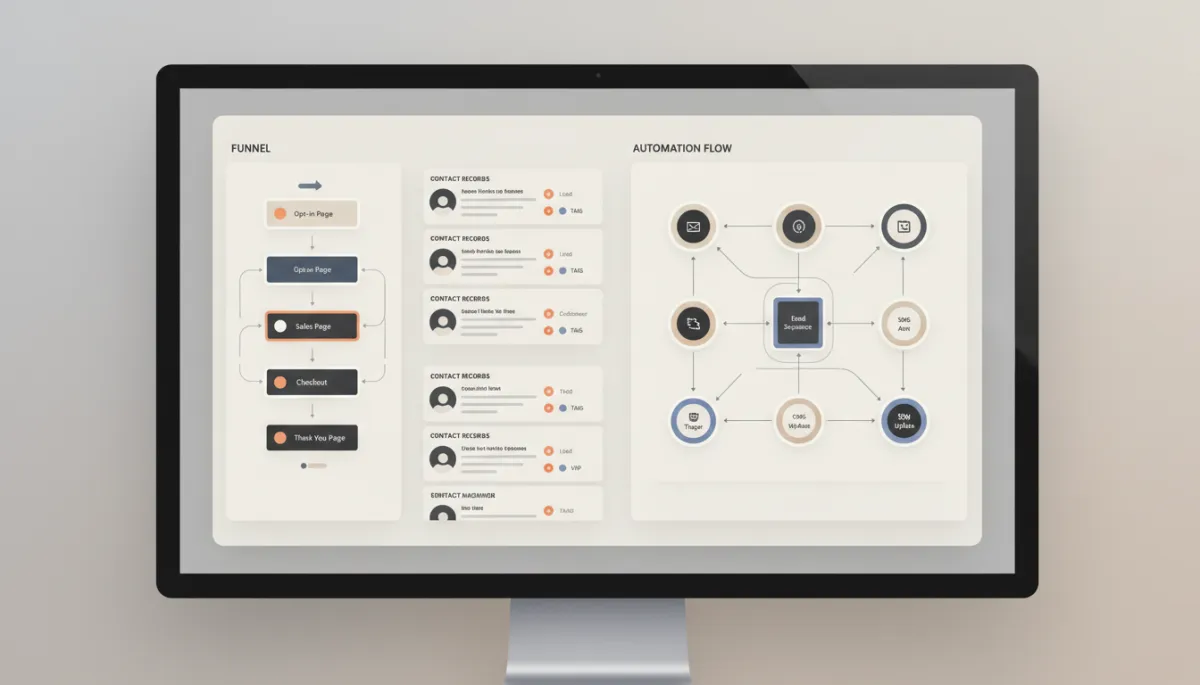
Well-connected funnels turn each form submission into a consistent, trackable sales journey.
This is where GoHighLevel workflows start to show their value. Instead of manual spreadsheet updates, every lead is automatically pushed into a defined path with minimal human intervention.
3.5 Build Smart Workflows, Not Complicated Workflows
The best GoHighLevel workflows automate repetitive tasks without creating chaos. Complexity for its own sake is a liability. Focus on a small set of high‑impact automations and design them with clear triggers, conditions, and exit rules.
High‑value workflow examples for service businesses and agencies:
New lead follow‑up sequence (speed‑to‑lead, nurture, and reminders)
Missed‑call text‑back to recover lost phone leads quickly
Appointment reminder and confirmation flows across email and SMS
No‑show follow‑up for rescheduling and re‑qualification
Proposal or quote follow‑up with logical branching based on response
Client onboarding workflow to collect information, schedule kick‑off, and hand over to fulfilment
Review request automation after key milestones or project completion
Re‑engagement campaigns for inactive leads or past clients
Each workflow should have:
A single, clear trigger (form submission, tag added, stage change, etc.)
Conditions that prevent contacts from entering the wrong sequence
Stop rules—if someone books, buys, or replies, the right automations stop
A defined testing process before going live
3.6 Set Up Calendars and Appointment Booking
For most GoHighLevel users, the calendar is where sales conversations become real. A strong booking flow reduces admin, improves show‑up rates, and gives your team predictable schedules. As part of your GoHighLevel implementation checklist, define:
Appointment types (strategy call, demo, onboarding, review meeting)
Team availability and round‑robin rules if multiple reps handle calls
Confirmation emails and SMS messages with clear expectations and links
Reminder cadence—for example, 24 hours, 3 hours, and 15 minutes before
No‑show follow‑up, including reschedule links and qualification questions
Calendar sync with Google or Outlook to avoid double‑booking
3.7 Configure Email, SMS, and Deliverability
Even the best‑designed workflow fails if messages do not reach the inbox or feel off‑brand. As part of your GoHighLevel implementation, prioritise communication infrastructure:
Branded email domain with proper DNS records for deliverability (SPF, DKIM, DMARC)
SMS sender IDs and compliance with local regulations and opt‑in rules
Email templates that match your tone, brand, and legal requirements (including unsubscribe links)
Thoughtful follow‑up timing—respecting time zones, working hours, and message frequency
Personalisation fields such as first name, company, and service interest should be consistent across your CRM for service businesses. That consistency depends on the earlier work you did with fields and tags.
3.8 Create Dashboards and Reporting From Day One
Reporting should not be an afterthought. When you design your GoHighLevel implementation, decide upfront what you want to see on your dashboards. Typical metrics for a business automation CRM include:
Lead source and campaign performance (by channel, by offer, by funnel)
Number of new leads per period and per source
Appointment booking rate and show‑up rate by campaign and rep
Pipeline value and conversion rates between each stage
Lost reasons and churn indicators for continuous improvement
GoHighLevel should help leadership make better decisions—not just automate tasks. When your CRM implementation checklist includes reporting from day one, you avoid the common situation where data exists but cannot be trusted.
4. Example: How a Service Business Could Implement GoHighLevel
Consider a consulting business running Facebook ads to a landing page that offers a free strategy call. This is a classic scenario where a structured GoHighLevel implementation makes a measurable difference.
A well‑implemented flow could look like this:
Prospect clicks a Facebook ad and lands on a GoHighLevel funnel page.
They complete a form to request a strategy call and choose a time on the calendar.
GoHighLevel automatically creates or updates the contact, records the lead source as Facebook Ads, and applies tags such as
src_facebook_adsandoffer_strategy_call.An opportunity is added to the “Consulting Sales” pipeline in the “Appointment Booked” stage, with the estimated value set from a custom field.
The prospect receives a confirmation email and SMS with the call details, Zoom link, and expectations for the session.
The sales team receives an internal notification via email or Slack with the lead’s key details and questionnaire answers.
Reminder messages are sent 24 hours and 1 hour before the call. If the prospect does not attend, a no‑show workflow triggers with a reschedule link.
If the deal is won, the opportunity moves to “Won,” a client onboarding workflow starts automatically, and the contact is added to a “Clients – Consulting” segment.
The result: the business no longer relies on manual follow‑up, spreadsheets, or individual memory. Every lead has a clear, measurable journey from click to client, all inside a single GoHighLevel CRM implementation.
5. GoHighLevel Implementation Mistakes to Avoid
Building before planning. Skipping process mapping leads to pipelines and workflows that do not match reality. Slow down at the start; it saves months later.
Using too many tags. Tags should be meaningful, not a dumping ground. Agree on a naming convention and audit tags regularly.
Not testing before launch. Always run internal test leads through each new workflow. Check timing, conditions, and edge cases before exposing real prospects to it.
Ignoring lead source tracking. Without attribution, you cannot scale paid campaigns confidently. Make source tracking part of your core CRM implementation checklist, not an optional extra.
Overcomplicating workflows. If your team cannot explain what a workflow does in one or two sentences, it is probably too complex. Split large automations into smaller, purpose‑built flows.
Not assigning CRM ownership. Someone in your organisation should own the CRM—data quality, process changes, and coordination with your GoHighLevel implementation partner. Without ownership, systems degrade quickly.
6. When Should You Work With a GoHighLevel Implementation Partner?
Some teams can handle a basic GoHighLevel setup internally—one pipeline, a simple booking flow, and a single follow‑up sequence. As your needs grow, though, implementation becomes more complex. A specialist partner like HL Growth Partner helps you treat GoHighLevel as a long‑term operating system, not a short‑term tool.
It is worth engaging a GoHighLevel implementation and fulfilment partner when you need:
Multiple pipelines across sales, onboarding, and account management
Advanced GoHighLevel workflows with branching logic and integrations
CRM migration from tools like HubSpot, Pipedrive, or spreadsheets, including data cleansing and mapping
Integrations with billing systems, support tools, or custom applications via API or middleware
Reporting dashboards for leadership that combine marketing, sales, and fulfilment metrics in one view
A structured sales‑to‑fulfilment handover and client onboarding system that reduces churn and rework
Team training and documentation so the CRM is used consistently, not just admired in meetings
HL Growth Partner specialises in this kind of work—structuring, building, testing, and optimising GoHighLevel implementations for service businesses, agencies, and SaaS teams. HL Growth Partner supports businesses across Australia with GoHighLevel implementation and fulfilment support, including teams looking for a GoHighLevel expert in Brisbane, GoHighLevel expert in Adelaide, GoHighLevel expert in Darwin, GoHighLevel expert in Hobart, GoHighLevel expert in Melbourne, GoHighLevel expert in Sydney, GoHighLevel expert in Perth, and a GoHighLevel expert in Canberra.
7. Conclusion: Turn GoHighLevel Into a Scalable Growth System
GoHighLevel can absolutely become the central operating system for your sales, marketing, and operations. The difference between a cluttered account and a clean, scalable CRM comes down to implementation. A disciplined GoHighLevel implementation checklist—process mapping, pipeline design, structured data, smart workflows, calendars, communication setup, and reporting—turns the platform into a reliable growth engine rather than another disconnected tool.
Successful GoHighLevel implementation is not about creating more workflows. It is about building a clean, reliable system that supports sales, marketing, operations, onboarding, and retention—while giving leadership the visibility they need to scale confidently.
Need help setting up GoHighLevel the right way? Book a GoHighLevel Implementation Strategy Call with HL Growth Partner. We will review your current setup, identify what needs to be fixed, and map the right CRM structure for your business growth. Book your strategy call here.
8. GoHighLevel Implementation FAQ
What is GoHighLevel implementation?
GoHighLevel implementation is the structured process of configuring GoHighLevel to match your real‑world business processes—lead generation, qualification, sales, onboarding, and client management. It goes beyond basic GoHighLevel setup and includes CRM architecture, automation design, data structure, integrations, testing, and team training so the system actually supports growth at scale.
How long does GoHighLevel implementation take?
Timelines vary with complexity. A focused CRM implementation checklist for a single offer and pipeline might take a few weeks, including planning, build, and testing. Multi‑pipeline setups, CRM migration, advanced workflows, and integrations can extend implementation to several weeks or a few months. Working with an experienced partner helps you move faster without sacrificing stability or data quality.
Can I implement GoHighLevel myself?
Yes, many businesses start with a self‑implemented GoHighLevel CRM setup—especially for simple pipelines and basic automations. The challenge appears as you add more offers, teams, and workflows. At that point, DIY implementation often leads to overlapping automations, inconsistent data, and reporting gaps. If GoHighLevel is becoming a core system rather than an experiment, partnering with a specialist is usually more cost‑effective over the long term.
What should be included in a GoHighLevel setup?
A robust GoHighLevel setup should include: clearly defined pipelines, well‑structured contact fields and tags, connected forms and funnels, calendar booking flows, essential GoHighLevel workflows (new lead follow‑up, reminders, onboarding), email and SMS configuration, lead source tracking, and dashboards for key metrics. For growing service businesses, it should also cover sales‑to‑fulfilment handover and client onboarding systems.
Why do GoHighLevel workflows fail?
Most workflow failures come from implementation rather than the platform itself. Common issues include unclear triggers, missing conditions, conflicting automations, poor tagging, and lack of testing. Sometimes the logic is correct, but deliverability or compliance problems prevent messages from reaching contacts. A disciplined GoHighLevel implementation checklist and proper QA reduce these risks significantly.
Is GoHighLevel suitable for growing service businesses?
Yes, GoHighLevel is well‑suited to growing service businesses, agencies, and SaaS companies that need a unified CRM, marketing, and automation platform. Its strength is in centralising lead capture, sales pipelines, communication, and workflows into one business automation CRM. The key is implementing it with the right structure so it stays manageable as your team, offers, and volume scale.
When should I hire a GoHighLevel implementation partner?
Consider hiring a GoHighLevel implementation partner when GoHighLevel is moving from “test tool” to “core system” for your organisation—especially if you are introducing multiple pipelines, advanced automations, CRM migration, integrations, or leadership‑level reporting. A partner like HL Growth Partner helps you avoid structural mistakes, accelerate build and testing, and ensure your CRM supports long‑term growth instead of becoming another system you eventually replace.
Related Articles
Go High Level
- Build an AI-Powered Customer Journey in GoHighLevel: From First Lead to Loyal Customer
- GoHighLevel Health Check: 25 Warning Signs Your CRM Is Slowing Down Your Business
- GoHighLevel for New Zealand Businesses: How to Build a CRM That Handles Privacy, SMS Compliance, and Local Timezones
GHL Automation
- GoHighLevel Email Automation: How to Build a Lead Nurture Sequence That Converts (2026)
- GoHighLevel Speed-to-Lead: Build a 5-Minute Response Workflow That Wins More Deals (2026)
- GoHighLevel Reputation Management: Automating Google Reviews That Actually Come In (2026)
